I have a report of projects grouped by owners first name. How do I sort the grouping alphabetically? | Community
Skip to main content
Level 2
March 7, 2023
Solved

I have a report of projects grouped by owners first name. How do I sort the grouping alphabetically?

  • March 7, 2023
  • 2 replies
  • 880 views
No text available
This post is no longer active and is closed to new replies. Need help? Start a new post to ask your question.
Best answer by Kundanism

HI @joachimfh 

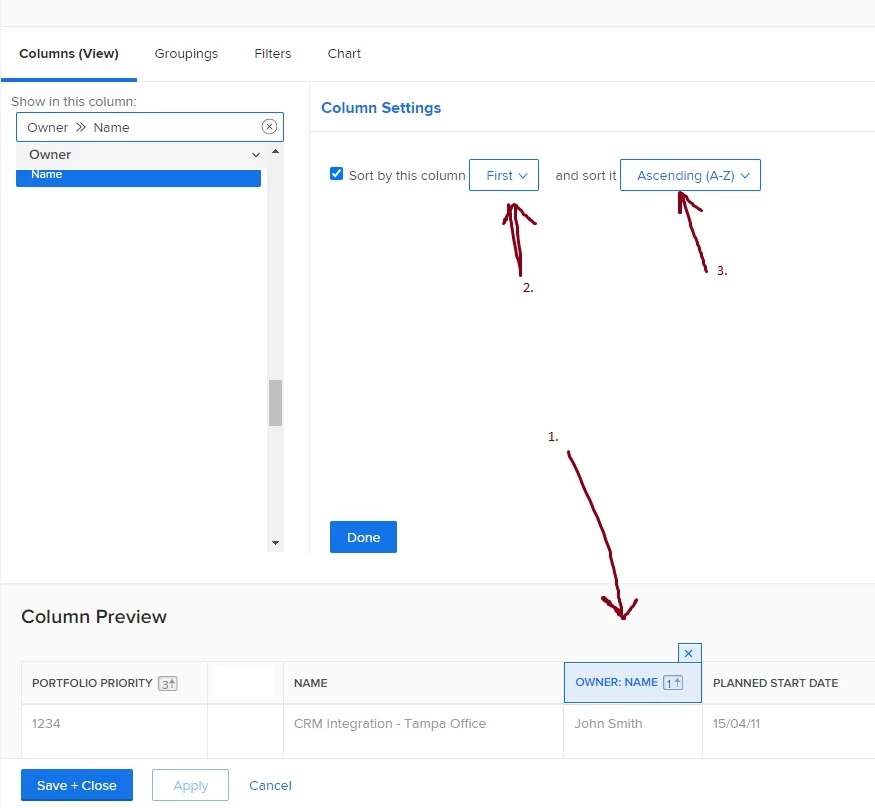
In column by clicking select Owner Name coluumn, then column settings > sort by this column > and sort it "Ascending A-Z". Check image for reference.

I believe this should work.

Mvh

Kundan.
2 replies

Kundanism
KundanismAccepted solution
Level 10
March 7, 2023

HI @joachimfh 

In column by clicking select Owner Name coluumn, then column settings > sort by this column > and sort it "Ascending A-Z". Check image for reference.

I believe this should work.

Mvh

Kundan.

JoachimFHAuthor
Level 2
March 7, 2023

Hi Kundan, thank you for your response. Unfortunately it is not the content within each group I want to sort. I want to sort the groups themselves alphabetically.


Community Advisor
March 7, 2023

Hi,


Sorting your columns alphabetically as Kundan has outlined, will automatically make your groupings follow suit and sort alphabetically too.


Best Regards,

Rich. 

Community Advisor
March 7, 2023

Hi,


You need to apply alphabetical sorting in your report view. Follow these steps:


1) In the report view editor, ensure that Owner>>Name is a column in your report and click on that column

2) Click on "Sort by this column"

3) Click to sort it " Ascending (A-Z)


You can then save+close your report and you will find that your projects will be sorted alphabetically by owner name


Best Regards,

Rich.