I am system admin, but when I create a new project, when I am in the project, I do not see the queue options on the left hand rail. Where do I go to adjust the view so I can see these options. | Community
Skip to main content
November 30, 2021
Question

I am system admin, but when I create a new project, when I am in the project, I do not see the queue options on the left hand rail. Where do I go to adjust the view so I can see these options.

  • November 30, 2021
  • 1 reply
  • 377 views

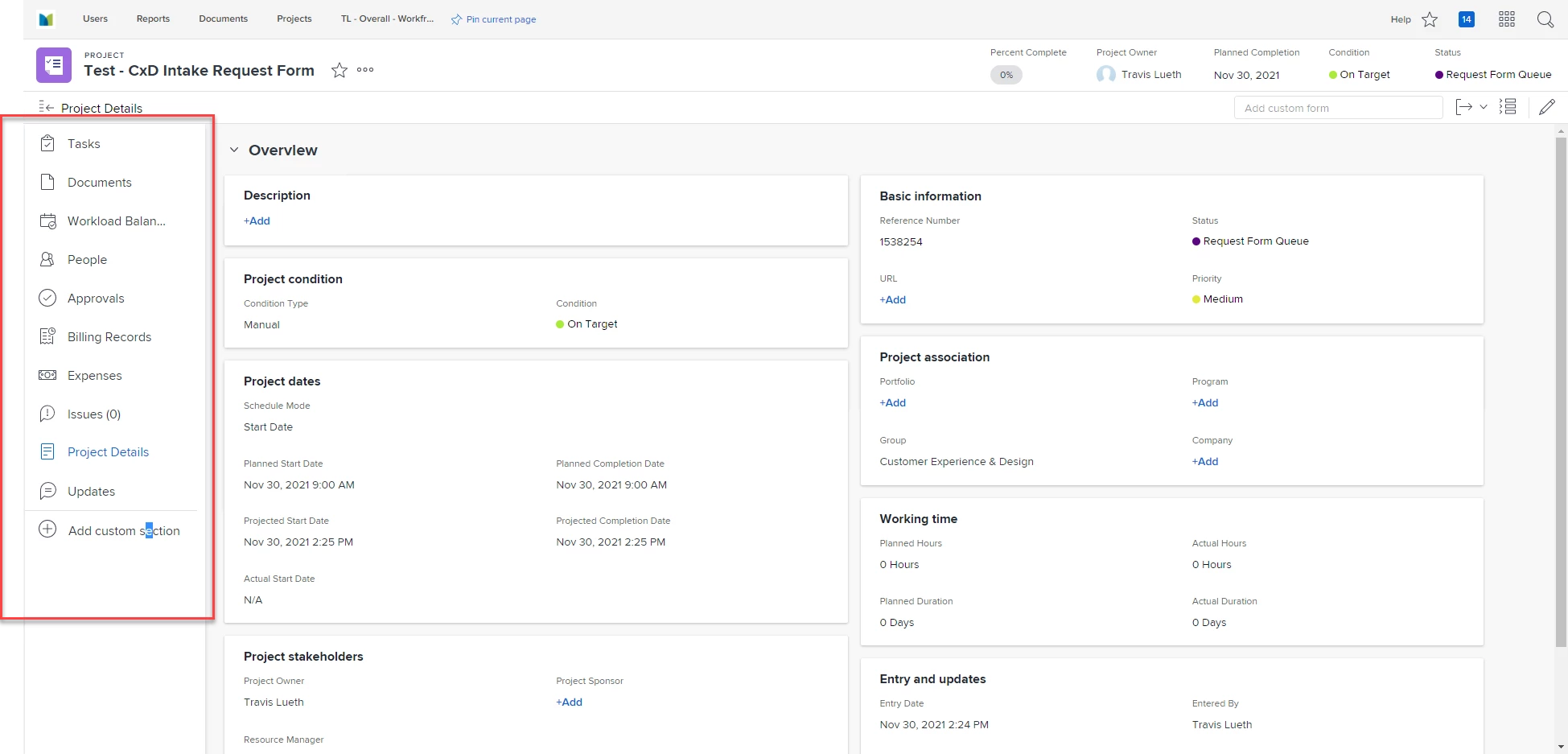
Here is an image of what I see in the project I just created. As you will see, the left hand rail is missing some values including the info around queue settings. Where do I go to adjust my view so that I see those? I am currently already set to System admin.
This post is no longer active and is closed to new replies. Need help? Start a new post to ask your question.

1 reply

Community Advisor
November 30, 2021

Hi Travis,

This will be because you have a layout template assigned to your user profile that has the queue settings disabled from your UI. To resolve this, go to your user profile and remove the layout template associated your account. You may need to log out and back in for the changes to take effect, but once done you should find that the missing options in the left hand pane now appear.

Best Regards,

RIch.