Level 2
April 20, 2023
Solved

How to Print Timesheet to PDF in New Experience

  • April 20, 2023
  • 2 replies
  • 1061 views

Has anyone figured out how to print Timesheet to PDF or export to Excel in New Experience?

This post is no longer active and is closed to new replies. Need help? Start a new post to ask your question.
Best answer by Madalyn_Destafney

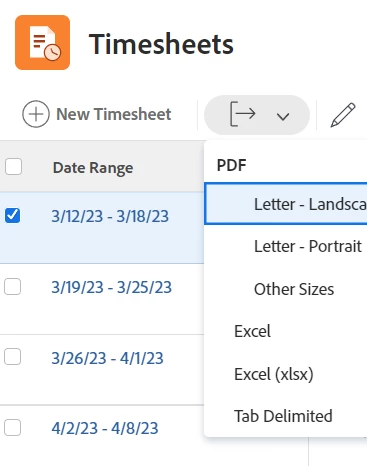
Hi there! Unfortunately I don't think there is a way to export a specific timesheet's details. You can only do it from the timesheet list view where it shows all the weeks, and only brings in the week, total hours, approvers, status. But if all you need it total hours than this would work for you : )
 

2 replies

Madalyn_Destafney
Community Advisor
Madalyn_DestafneyCommunity AdvisorAccepted solution
Community Advisor
April 21, 2023

Hi there! Unfortunately I don't think there is a way to export a specific timesheet's details. You can only do it from the timesheet list view where it shows all the weeks, and only brings in the week, total hours, approvers, status. But if all you need it total hours than this would work for you : )


If this helped you, please mark correct to help others : )
Level 2
April 21, 2023

Thanks Madalyn

I am trying to print individual timesheets for a project team members who aren't Workfront users so I can capture their time as part of the overall project effort. Or export the individual timesheets to excel. Seems like there is no way 😞

Julie