How to notify a user in the request queue from the custom form | Community
Skip to main content
Level 4
July 18, 2023
Solved

How to notify a user in the request queue from the custom form

  • July 18, 2023
  • 2 replies
  • 2735 views

I have created a project request queue. Is there any field in the custom form that would allow you to notify a user when you're filling in the request?


I know I could have an single line text field / a drop down box, but that won't actually notify the user.


Is the only way to assign the user BEFORE the request has actually been submitted? or is there a field that can be tweaked to allow this?
This post is no longer active and is closed to new replies. Need help? Start a new post to ask your question.
Best answer by Madalyn_Destafney

Sure thing!
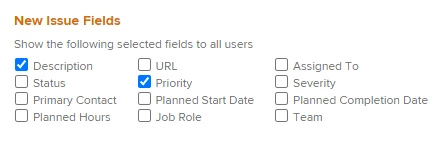
When you're in your request queue project (where the queue is set up and requests go to unless routed elsewhere), go to Queue Details on the left side. In the New Issue Fields, you can have 'Assigned To' selected so the requester can input a person's name they want the request to go to (by way of being assigned). Or you can have Team if it'll be to a Team. In the Assigned To, you're able to put more than one person.


If this helped you out, please mark correct to help others : )

2 replies

Madalyn_Destafney
Community Advisor
Community Advisor
July 18, 2023

Hi there, when users are submitting something to the queue, that is coming in as an Issue. You can set up routing on your queue topics or queue to automatically go to X user (or team) - recommended if these requests will always go to same person or team - or you can include the assignment field in your queue details setup so the request can be assigned to a user/team if you want the requester to fill this in with their request (better if request assignments are more variable). The users are notified of the requests when they come in bc they are assigned (ensure their email notifications are on for this). 

If this helped you, please mark correct to help others : ) Let me know if you have more questions on this!

If this helped you, please mark correct to help others : )
JaxelleAuthor
Level 4
July 19, 2023

Hi Madalyn,


Thanks for your response.


I don't believe the first suggestion with the routing on the queue topics will work as the idea is the requests should go to several different individuals each request rather than a team and a routing route can only go to 1 assignee or a team, right?


I can't find the assignment field you mention in the queue details set up? but this does sound like the correct path as I want the requester to fill this in with their request. Can you please elaborate where this will be?


Thank you!


Madalyn_Destafney
Community Advisor
Madalyn_DestafneyCommunity AdvisorAccepted solution
Community Advisor
July 19, 2023

Sure thing!
When you're in your request queue project (where the queue is set up and requests go to unless routed elsewhere), go to Queue Details on the left side. In the New Issue Fields, you can have 'Assigned To' selected so the requester can input a person's name they want the request to go to (by way of being assigned). Or you can have Team if it'll be to a Team. In the Assigned To, you're able to put more than one person.


If this helped you out, please mark correct to help others : )

If this helped you, please mark correct to help others : )
Richard_Carlson
Community Advisor
Community Advisor
July 18, 2023

This might be a slightly different take on the solution but we have incoming request queues and people would monitor those queues for new requests and then convert them to projects in a timely manner.  This removes the manual step where the requester has to send a message to someone to inform them that a request has been submitted.


To answer a part of your question directly - requesters do not have the authority within the system to assign work to anyone.  What you're suggesting might not be possible.

JaxelleAuthor
Level 4
July 19, 2023

Thanks Richard. I also have a report for each team which shows new requests coming through but that's why I'm looking for a field in the request form that will allow a worker to be notified/ and assigned (rather than doing it after the request has been submitted).