How to Filter out the Resources no longer working on the project | Community
Skip to main content
Level 3
February 22, 2024
Question

How to Filter out the Resources no longer working on the project

  • February 22, 2024
  • 2 replies
  • 460 views

Hi Community,

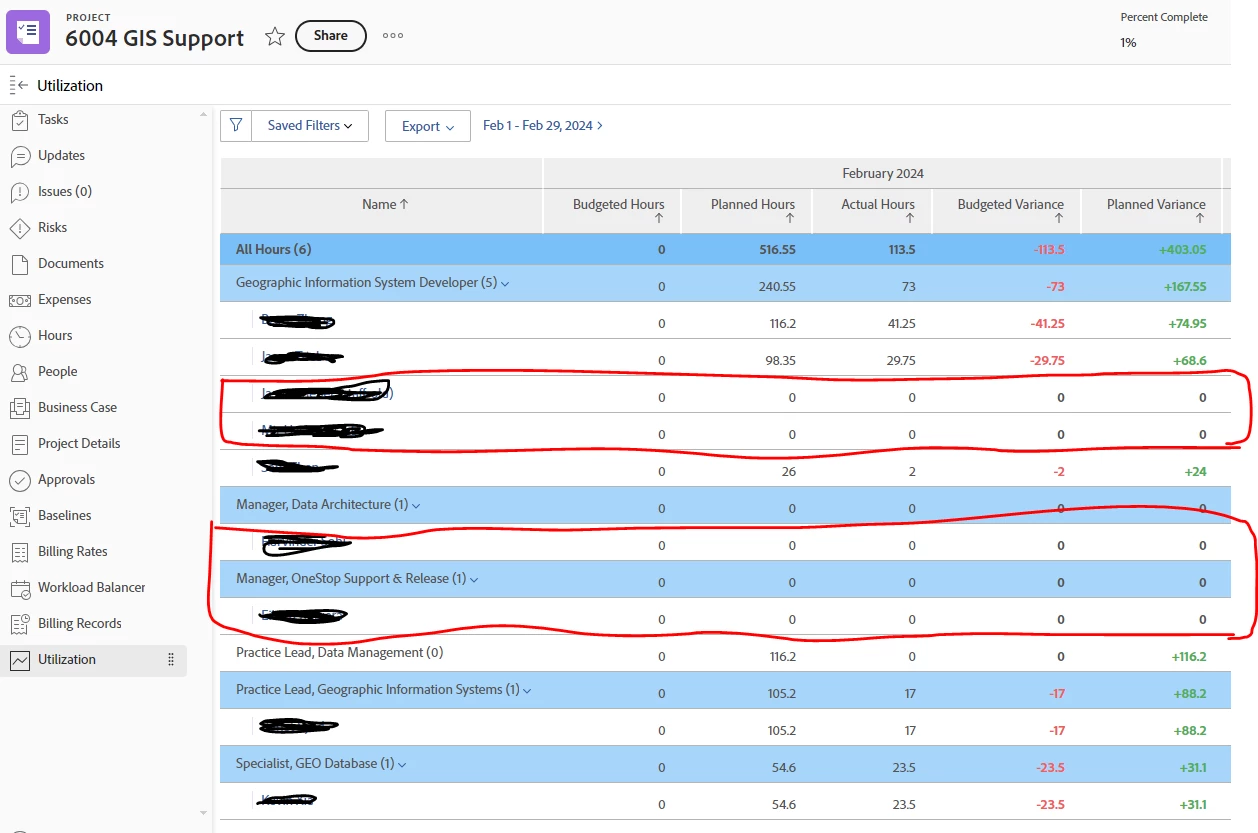
How can I filter out resources that are no longer working on project so that I can only see resources who are currently working on the project as shown in screenshot below. 

I have tried bunch of filters on the utilization screen but it doesn't seems that the filter on the utilization tab is working as expected, 

Any help will be appreciated, 


This post is no longer active and is closed to new replies. Need help? Start a new post to ask your question.

2 replies

skyehansen
Community Advisor and Adobe Champion
February 22, 2024

I made a filter for Assignment / Planned Hours / Greater than 0 -- this seemed to work for me. What sort of errors do you get?

RandyRoberts
Community Advisor
Community Advisor
February 27, 2024

What Skye said…

or you could just use greater than 0