How to add Total of a specific Column field on report and Dynamically update it? | Community
Skip to main content
Level 2
January 16, 2024
Question

How to add Total of a specific Column field on report and Dynamically update it?

  • January 16, 2024
  • 1 reply
  • 1101 views

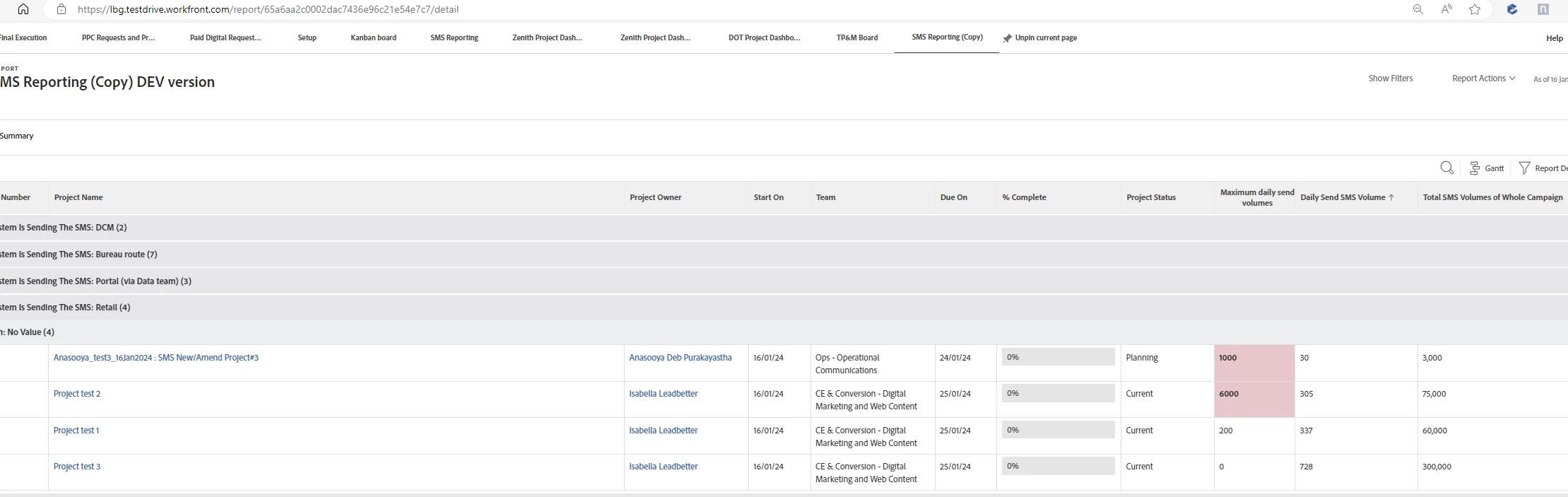
We have a reporting requirement where in the client wants to see 2 fields on the report which will display the Total of 2 specific column values. For example from the screenshot attached they want 2 fields on the report below each grouping section

1) Total of (Maximum daily send volumes) column = 1000+6000+200+ 0 = 7200 

2) Total of (Daily Send SMS Volume) column = 30+305+337+728 = 1400


Both these values should dynamically change based on the entry of projects here. If there are 5 entries then the value should update accordingly


Once the Total is captured for both these columns then

If the Total of (maximum daily send volumes) column is > than say a certain value (E.g. say 100000) then it should colour code this total of (maximum daily send volumes) field. 

Can someone please guide me on how best to approach the above requirement? it would be of great help. 


@richard_le_  Do you have any suggestions?
 

This post is no longer active and is closed to new replies. Need help? Start a new post to ask your question.

1 reply

Doug_Den_Hoed_AtAppStore
Community Advisor
Community Advisor
January 16, 2024


Hi @anasooya,


Unfortunately, conditionally color coding totals are beyond Workfront's native reporting capabilities, but if meeting this requirement is important enough, I invite you to consider our Magic Reports solution, which could accomplish what you're after.


Regards,
Doug 

anasooyaAuthor
Level 2
January 17, 2024

thanks @doug_den_hoed__atappstore for your response. I will have a look into the link you have shared.  If we rule out the color coding part, is it possible to show the Total fields as per my above requirements? How to go about with that?

Heather_Kulbacki
Community Advisor
Community Advisor
January 17, 2024

If you're OK with just the totals, you can do that in the report setup - select 'Sum' in the 'Summarize this column by' dropdown and the totals will show on your grey grouping lines - as long as these are number (or currency) fields. If they are text fields you won't have that Summarize by option.