
How's This Grab You? | Community
Skip to main content
Doug_Den_Hoed_AtAppStore
Community Advisor
Community Advisor
November 16, 2024

How's This Grab You?

  • November 16, 2024
  • 1 reply
  • 528 views


Hi folks,


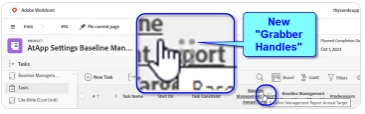
In case you missed the memo (as I might have), the way to to dynamically rearrange columns in a Workfront Report or view has changed a bit: on hover, there are new "Grabber Handles" (similar to those used to re-order custom tabs on certain left menus), which can be a bit tricky to spot, depending on how the column header text lands. Now that I'm aware of them, I know where to look and click (typically in Chrome)...but I've also heard reports that they don't always respond, and (in a worst case) can actually cause the desired column to disappear completely from the view -- including the definition.


Any stories or tricks to share?


Regards,

Doug


This post is no longer active and is closed to new replies. Need help? Start a new post to ask your question.

1 reply

Adobe Employee
December 2, 2024

Hi @doug_den_hoed__atappstore


Thank you for your question! I personally haven't experienced the described behavior. Can you test in different browsers to see if this is a system-wide problem? If you discover that it is, I would encourage you to submit a support ticket so that our team can look into this further. 


- Monica