How might one remove posted task travel time from budgeted hours | Community
Skip to main content
New Member
May 8, 2025
Solved

How might one remove posted task travel time from budgeted hours

  • May 8, 2025
  • 3 replies
  • 455 views

Hello,


We have people post their travel time on projects to a task on their task list. We don't bill our clients for travel time. I have a custom form that lists total budget hours, then a field that subtracts the actual hours posted to the project to show their remaining budget on their dashboard, but I cannot figure out how to pull out or separate/remove the hours posted to a task where the "source" is Travel Time.


Task List Hour Type = Task Time

Source = Travel Time


Just need a way to have a field that takes Actual Hours Posted to the project minus any Travel Time Hours posted so that I can show actual budget hours remaining. 

Hoping someone can help? ...and unfortunately no, I don't have fusion.


Thank you!
This post is no longer active and is closed to new replies. Need help? Start a new post to ask your question.
Best answer by Sven-iX

I'm not aware of a way to achieve this: 
As far as the project is concerned, a booked hour is a cost to the project and therefore part of the hours collection. 


By using a "Travel time" hour type you exclude it from the revenue/cost calculations by unchecking Count as Revenue (your current approach would still include them because the hours are Task time).


Workfront only has a field that captures total hours booked on the project, it doesn't split by hour type.


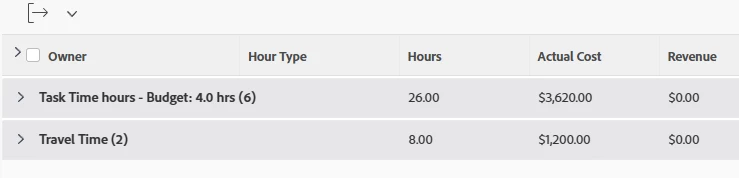
Best I can do is a grouped HOUR report (here based on hour type, but you could also group by checking source.name=Travel)


3 replies

Sven-iX
Community Advisor
Sven-iXCommunity AdvisorAccepted solution
Community Advisor
May 9, 2025

I'm not aware of a way to achieve this: 
As far as the project is concerned, a booked hour is a cost to the project and therefore part of the hours collection. 


By using a "Travel time" hour type you exclude it from the revenue/cost calculations by unchecking Count as Revenue (your current approach would still include them because the hours are Task time).


Workfront only has a field that captures total hours booked on the project, it doesn't split by hour type.


Best I can do is a grouped HOUR report (here based on hour type, but you could also group by checking source.name=Travel)


skyehansen
Community Advisor and Adobe Champion
May 13, 2025

I'm not clear on where you are stashing this "travel time" task, but as long as it is not in the same project, you might want to look into filtering hour types and see if it would work for you. See this link:

https://experienceleague.adobe.com/en/docs/workfront/using/manage-work/projects/manage-projects/edit-projects


I wasn't able to get this working, myself, but that's OK, we don't need to do this yet. 

kautuk_sahni
Community Manager
Community Manager
July 29, 2025

@janellebr1 Just checking in — were you able to resolve your issue? We’d love to hear how things worked out. If the suggestions above helped, marking a response as correct can guide others with similar questions. And if you found another solution, feel free to share it — your insights could really benefit the community. Thanks again for being part of the conversation!

Kautuk Sahni