How do I move a bulk # of projects to a new Portfolio & Program | Community
Skip to main content
Level 2
December 21, 2022
Solved

How do I move a bulk # of projects to a new Portfolio & Program

  • December 21, 2022
  • 2 replies
  • 1559 views
No text available
This post is no longer active and is closed to new replies. Need help? Start a new post to ask your question.
Best answer by Madalyn_Destafney

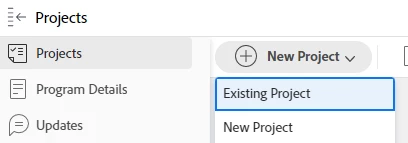
Hi there, if you're ever moving some projects program to program within the same portfolio, you can just go to the program you want the projects to move to, then from the Projects tab of the program, click 'add new' > 'existing project' and pull in the projects you want. 


For moving them to a new portfolio and program, consolidate all the projects you want moved in a project report. Then select the checkbox to select all the projects in your report and click edit/pencil icon and then it'll bring up a modal where you can revise shared project fields, so revise the portfolio & program there. Then save and you're good to go.


If this helps you please mark this as correct to help others : )

2 replies

skyehansen
Community Advisor
December 21, 2022

"move" doesn't exist for projects. Bulk edit all the projects and change the portfolio and program field.

Madalyn_Destafney
Community Advisor
Madalyn_DestafneyCommunity AdvisorAccepted solution
Community Advisor
January 6, 2023

Hi there, if you're ever moving some projects program to program within the same portfolio, you can just go to the program you want the projects to move to, then from the Projects tab of the program, click 'add new' > 'existing project' and pull in the projects you want. 


For moving them to a new portfolio and program, consolidate all the projects you want moved in a project report. Then select the checkbox to select all the projects in your report and click edit/pencil icon and then it'll bring up a modal where you can revise shared project fields, so revise the portfolio & program there. Then save and you're good to go.


If this helps you please mark this as correct to help others : )

If this helped you, please mark correct to help others : )