How can I resolve task dependencies not updating automatically in Adobe Workfront? | Community
Skip to main content
December 26, 2024
Solved

How can I resolve task dependencies not updating automatically in Adobe Workfront?

  • December 26, 2024
  • 2 replies
  • 745 views

I’m encountering an issue where task dependencies in Adobe Workfront are not updating automatically when changes are made to predecessor or successor tasks. This is causing discrepancies in project timelines and confusion for the team. Has anyone experienced this problem, and if so, how can I fix it to ensure dependencies update correctly?"
This post is no longer active and is closed to new replies. Need help? Start a new post to ask your question.
Best answer by KellieGardner

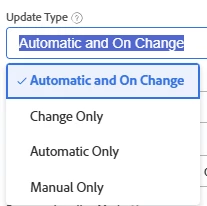
@alexrose691 - I would double check that your projects update type is not set to manual.


Project Update Type overview | Adobe Workfront

2 replies

KellieGardner
Community Advisor
KellieGardnerCommunity AdvisorAccepted solution
Community Advisor
December 30, 2024

@alexrose691 - I would double check that your projects update type is not set to manual.


Project Update Type overview | Adobe Workfront

KellieGardner
Community Advisor
Community Advisor
January 2, 2025

@alexrose691 - please let me know if that solved your issue or if you need additional help.

Doug_Den_Hoed_AtAppStore
Community Advisor
Community Advisor
March 25, 2025


Hi @alexrose691,


In addition to the Update Type suggestion @kelliegardner mentioned, it might also be good to review this Recalc Timelines primer, and if you are using cross project predecessors, I'd also invite you to learn about some gotchas in this video about our Recalc Helper solution.


Regards,

Doug