
How can i remove a list view from list controls when there is no trash can? | Community
Skip to main content
RandyRoberts
Community Advisor
Community Advisor
June 9, 2020
Solved

How can i remove a list view from list controls when there is no trash can?

  • June 9, 2020
  • 2 replies
  • 601 views

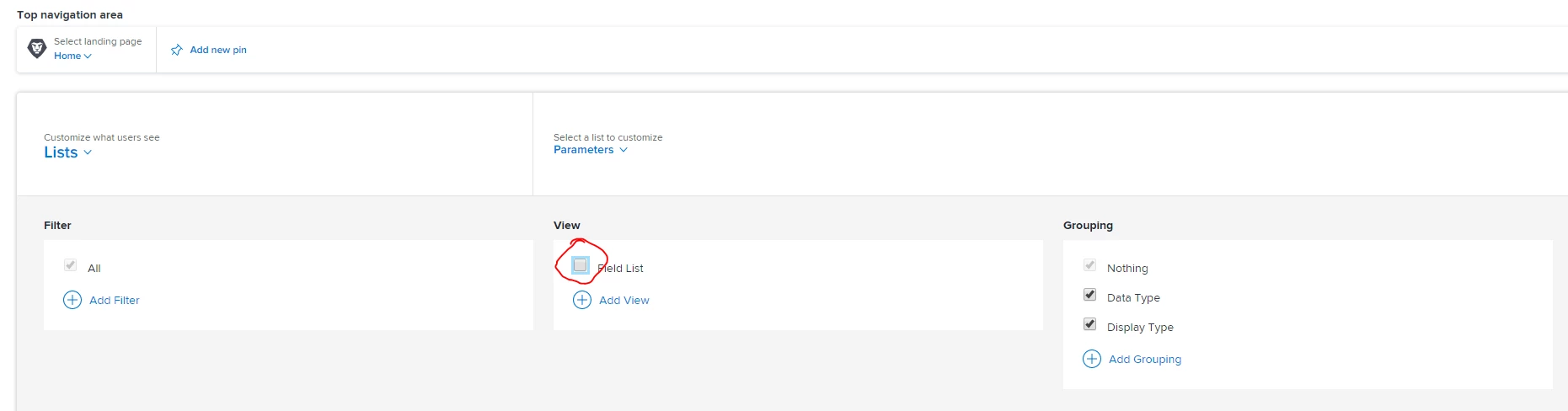
In my list of fields there is a view called "field list" that I would like to remove but there is no trash can icon to click. How can I remove it? Please see screenshot.

This post is no longer active and is closed to new replies. Need help? Start a new post to ask your question.
Best answer by imgrund

Hi - As Kevin mentioned, you can do this via the Layout Template. I'm in NWE so I know it doesn't look the exact same, but if you go to Lists and Parameters, you can uncheck it there.
2 replies

Level 10
June 10, 2020

This means it's a built-in and can't be deleted.

You can sometimes disable these via the Layout Templates instead (though unfortunately, not always).

imgrund
Adobe Employee
imgrundAdobe EmployeeAccepted solution
Adobe Employee
June 10, 2020

Hi - As Kevin mentioned, you can do this via the Layout Template. I'm in NWE so I know it doesn't look the exact same, but if you go to Lists and Parameters, you can uncheck it there.

RandyRoberts
Community Advisor
Community Advisor
June 10, 2020

Thanks, I did that and it works. As an admin I wasn't using a layout template and that was the problem.