How can I capture the number of issues emailed into a request queue? | Community
Skip to main content
Level 5
October 4, 2024
Solved

How can I capture the number of issues emailed into a request queue?

  • October 4, 2024
  • 1 reply
  • 811 views

We have an existing request queue, with the queue project named Pre-existing Issue.

  • Users can enter a request into that queue via Workfront (Requests, New Request, etc.)
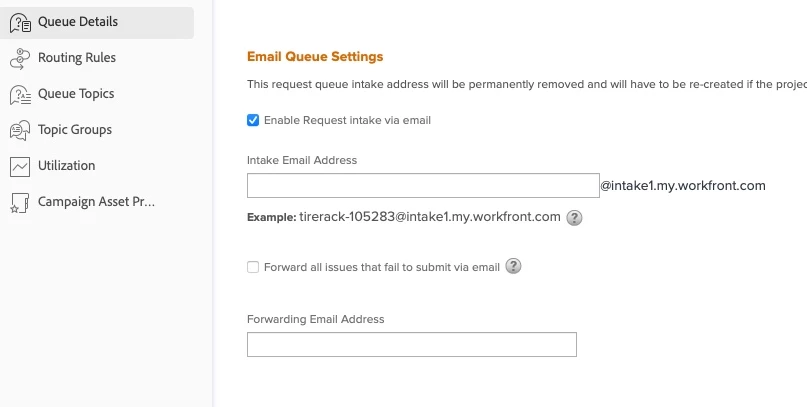
  • We recently enabled request intake via email into that same queue, so users can now send an email to the designated intake email address to submit issues into the same queue

How can I capture how many of the issues/requests have been submitted via email?

  • My queue project setup has Queue Details > Queue Properties > Request Type - "Request" is selected
  • In an Issues report, the column Issue>>Issue Type seems to report "Issue" if it was emailed, but "Request" if it was entered via the queue.

Is that a reliable way to get a count of the number items that were emailed into the queue, or is there another/better way to accomplish this?


This post is no longer active and is closed to new replies. Need help? Start a new post to ask your question.
Best answer by Sven-iX

Hi @catherineke 


WF doesn't have a property on opTasks to indicate whether it originated from an email. 

Since only emails where the FROM address matches a WF user are entered as ticket (emails from non-users are silently rejected), WF just sticks the body into the description field, the subject in the, uh, subject field and sets the "enteredBy" and "owner" to the user tied to the FROM address. 


Your idea to distinguish by issue type works until you have a queue that allows type=issue.


You could do this add a custom form with a required field. This means someone submitting in WF cannot submit without a value; email submissions will have a blank in that field. If you use a dropdown/checkbox/radio don't set any option as default (because WF will set it for Email submissions)

1 reply

Sven-iX
Community Advisor
Sven-iXCommunity AdvisorAccepted solution
Community Advisor
October 4, 2024

Hi @catherineke 


WF doesn't have a property on opTasks to indicate whether it originated from an email. 

Since only emails where the FROM address matches a WF user are entered as ticket (emails from non-users are silently rejected), WF just sticks the body into the description field, the subject in the, uh, subject field and sets the "enteredBy" and "owner" to the user tied to the FROM address. 


Your idea to distinguish by issue type works until you have a queue that allows type=issue.


You could do this add a custom form with a required field. This means someone submitting in WF cannot submit without a value; email submissions will have a blank in that field. If you use a dropdown/checkbox/radio don't set any option as default (because WF will set it for Email submissions)