Hover over pop-up on project report | Community
Skip to main content
Level 5
October 7, 2024
Solved

Hover over pop-up on project report

  • October 7, 2024
  • 1 reply
  • 1035 views

We're currently using text mode on a project report to list all people involved in the project (code below). Sometimes this list is rather long and can make the report look clunky. Is there a way to have this replaced with an icon or text that reads Project Team that you could hover over to display as a pop up with the list of users instead? Any help is appreciated 🙂


description=Project Team
displayname=Project Team
listdelimiter=<div>
listmethod=nested(projectUsers).lists
textmode=true
type=iterate
valueexpression=CONCAT("- ",{user}.{name})
valueformat=HTML
This post is no longer active and is closed to new replies. Need help? Start a new post to ask your question.
Best answer by Sven-iX

Hi @kasey-gagne 


So options are limited but it can be done - with caveats:

  • use HTML
  • use compound columns (joined with sharecol=true)
  • it really pushes the reporting UI - no idea if Adobe decides to strip such HTML

Below is the code to get the compound column to show a tool tip with the project users on hover. 

It uses the feature that a "title" attribute in a tag becomes a tool tip that shows when you hover over the tag. I am using a "div" tag here.


Steps:

  1. create 3 new columns and move the all the way to the left. 
  2. in the first column paste the below code it will populate and join the 3 columns you created


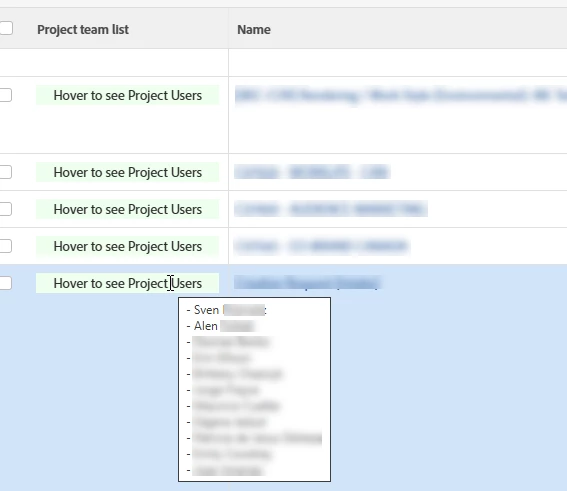
column.0.displayname=Project team list column.0.sharecol=true column.0.textmode=true column.0.valueformat=HTML column.0.value=<div style="cursor: pointer; text-align:center; background-color: #efe;" title=" column.1.displayname=Project Team column.1.listmethod=nested(projectUsers).lists column.1.description=Project Team column.1.sharecol=true column.1.valueformat=HTML column.1.valueexpression="- "+{user}.{name} column.1.textmode=true column.1.listdelimiter=&#013; column.1.type=iterate column.2.value=">Hover to see Project Users</div> column.2.valueformat=HTML column.2.textmode=true ​


Result:

1 reply

Sven-iX
Community Advisor
Sven-iXCommunity AdvisorAccepted solution
Community Advisor
October 8, 2024

Hi @kasey-gagne 


So options are limited but it can be done - with caveats:

  • use HTML
  • use compound columns (joined with sharecol=true)
  • it really pushes the reporting UI - no idea if Adobe decides to strip such HTML

Below is the code to get the compound column to show a tool tip with the project users on hover. 

It uses the feature that a "title" attribute in a tag becomes a tool tip that shows when you hover over the tag. I am using a "div" tag here.


Steps:

  1. create 3 new columns and move the all the way to the left. 
  2. in the first column paste the below code it will populate and join the 3 columns you created


column.0.displayname=Project team list column.0.sharecol=true column.0.textmode=true column.0.valueformat=HTML column.0.value=<div style="cursor: pointer; text-align:center; background-color: #efe;" title=" column.1.displayname=Project Team column.1.listmethod=nested(projectUsers).lists column.1.description=Project Team column.1.sharecol=true column.1.valueformat=HTML column.1.valueexpression="- "+{user}.{name} column.1.textmode=true column.1.listdelimiter=&#013; column.1.type=iterate column.2.value=">Hover to see Project Users</div> column.2.valueformat=HTML column.2.textmode=true ​


Result:

Sven-iX
Community Advisor
Community Advisor
October 8, 2024

Hey @kasey-gagne 

If you want to be adventurous, you can include e.g. the name field in the compound column like so: Wrap the div around the name - the benefit is that since name is a link, we get the neat pointer cursor

Create 5 columns at the very left and paste


column.0.sharecol=true column.0.valueformat=HTML column.0.value=<div title=" column.0.displayname=Project team list column.0.textmode=true column.1.listdelimiter=&#013; column.1.valueformat=HTML column.1.listmethod=nested(projectUsers).lists column.1.valueexpression="- "+{user}.{name} column.1.displayname=Project Team column.1.sharecol=true column.1.textmode=true column.1.description=Project Team column.1.type=iterate column.2.value="> column.2.textmode=true column.2.sharecol=true column.2.valueformat=HTML column.3.link.linkproperty.0.valuefield=ID column.3.link.linkproperty.0.valueformat=int column.3.link.linkproperty.0.name=ID column.3.link.lookup=link.view column.3.link.valueformat=val column.3.link.valuefield=objCode column.3.descriptionkey=name column.3.linkedname=direct column.3.sharecol=true column.3.listsort=string(name) column.3.section=0 column.3.shortview=false column.3.stretch=30 column.3.querysort=name column.3.namekey=name.abbr column.3.valueformat=HTML column.3.textmode=true column.3.width=250 column.3.valuefield=name column.4.value=</div> column.4.textmode=true column.4.valueformat=HTML


Result