Help with WF custom form calculated field based on a calculated field | Community
Skip to main content
Level 2
March 24, 2026
Solved

Help with WF custom form calculated field based on a calculated field

  • March 24, 2026
  • 2 replies
  • 17 views

Hello - 

On a WF custom request form, I am trying to create a calculated field that totals the values generated in other calculated fields. If it matters, the other calculated fields plus corresponding fill-in fields for quantity entries are set to display only when a selection is made from a separate dropdown field. For the other calculated fields, I am multiplying the quantity entries by specific numbers using the PROD expression: e.g.,  PROD({DE:Ad or Graphic Qty},100)

So, the user selects one or more choices from a dropdown field (e.g., Ad or Graphic)

A new field/fields then displays to enter a quantity for the selected option (Ad or Graphic Qty - this field formatted as a number). The PROD calculated field (Ad or Graphic Cost - also formatted as a number) also then displays. This calculated field works as expected. 

The last calculated field is set up to SUM all of the previous calculated fields, but the number always comes up as 0: e.g., SUM({DE:Ad or Graphic Cost}, {DE:Banner-Std Cost})

I can’t figure out what I’m doing incorrectly to get the total of any of the values created by the PROD calculated fields. 

Thank you in advance!
Best answer by Sven-iX

Hi ​@HeatherLa6 

I can confirm that. 
Note that once the form is saved, the SUM field will actually calculate and show the expected value, just not in “edit” mode. 

I think this is a bug worth flagging as a ticket: The form logic clearly is able to hook into the value of a field when it updates - it’s just not doing so for a calculated field. I think it should :) 

As a workaround you can replicate the logic of the individual fields into the SUM field: 

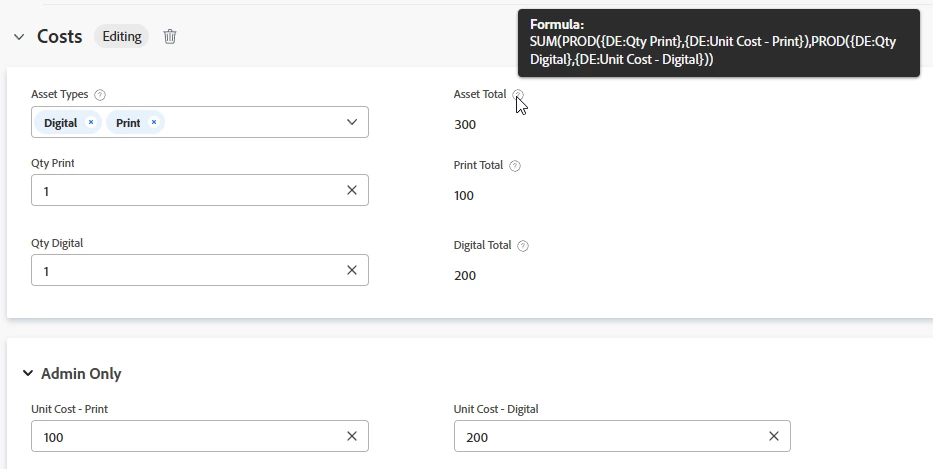
SUM(PROD({DE:Qty Print},100),PROD({DE:Qty Digital},100))

This field will update dynamically the way you want.

You could trick this out further by having and admin-only section where you set the unit costs; makes maintenance a bit easier:


2 replies

VicSellers
Community Advisor and Adobe Champion
March 25, 2026

Posted a response here meant for another one (and can’t delete)

Sven-iX
Community Advisor
Sven-iXCommunity AdvisorAccepted solution
Community Advisor
March 25, 2026

Hi ​@HeatherLa6 

I can confirm that. 
Note that once the form is saved, the SUM field will actually calculate and show the expected value, just not in “edit” mode. 

I think this is a bug worth flagging as a ticket: The form logic clearly is able to hook into the value of a field when it updates - it’s just not doing so for a calculated field. I think it should :) 

As a workaround you can replicate the logic of the individual fields into the SUM field: 

SUM(PROD({DE:Qty Print},100),PROD({DE:Qty Digital},100))

This field will update dynamically the way you want.

You could trick this out further by having and admin-only section where you set the unit costs; makes maintenance a bit easier:


Level 2
March 25, 2026

Hi Sven. The workaround works, thank you 🙂

Notes: I set up the SUM field in the form in Sandbox 1, applied and saved, then started entering a request to test it - this is where the SUM calculation did not work. Are you saying that if I had submitted the request that the calculation would have worked on the submission? 

Also - the Admin Only option won’t work for us as we need a full department to see it, not just the system administrators.

Appreciate your help!

Heather 

Sven-iX
Community Advisor
Community Advisor
March 25, 2026

Hi ​@HeatherLa6 
Yep - you’ll see the fields updating after submission - just not in Edit mode. 

Sorry - I meant the admin only for where you set unit costs only - not the calculation :) 
And instead of admin-only you could restrict access to a group, too.