Help with an AND statement in textmode reporting | Community
Skip to main content
Level 2
August 14, 2024
Question

Help with an AND statement in textmode reporting

  • August 14, 2024
  • 3 replies
  • 1279 views

I want add on to an existing report that is working nicely for me. In the text mode for filters, I want to add a statement to only show projects where production required = yes. 


I'm having issues with this DE syntax. I can't add AND to it or replace it with AND which is what I feel like needs to happen for this to work. 


Here is the current syntax:
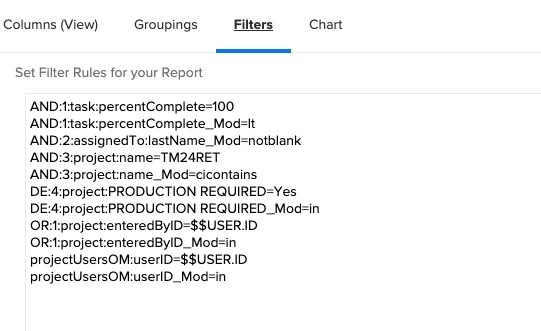
 

The way the above report is constructed, it shows all projects/assignments, it IS NOT filtering out for projects that only require production.


This post is no longer active and is closed to new replies. Need help? Start a new post to ask your question.

3 replies

ErickDiAuthor
Level 2
August 14, 2024

My Custom text mode imaged below works great for this one report I use.


I now want to add another AND statement to filter for Projects where Production Required = YES. Using the standard mode, I've determined that the language needed to identify production required tasks is below:


When inserting this into my report, it does not work correctly at all. I've tried to put "AND:" instead of "DE:" and I receive an error. Here is how I image the syntax should work, but I am clearly incorrect:


I attached an image of the textmode I am using and the result. Again, I want to ONLY see projects where Production required = Yes. So, the current result in the attached image is not achieving what I would like.


RandyRoberts
Community Advisor
Community Advisor
August 15, 2024

What kind of report is it? Task report? Project report?

I see you have the task object listed on line 1 and 2 and the project object listed on lines 4-11.

You only need to list the object if the object is different than the kind of report you have. Also, you need to ID custom fields with the "DE:" prefix, meaning data extension.


TIP: if this solved your problem, I invite you to consider marking it as a Correct Answer to help others who might also find it of use.
If you like my content, please take a moment to view and vote on my Idea Requests: https://tinyurl.com/mysocalledideas


ErickDiAuthor
Level 2
August 14, 2024

Here is how I imagine the text mode should work, but I am incorrect. I receive an error when using the syntax below. 


lgaertner
Level 9
August 15, 2024

Hi,


I think you need to use the DE: directly in front of your custom fields:

AND:1:task:percentComplete=100 AND:1:task:percentComplete_Mod=lt AND:2:assignedTo:lastName_Mod=notnull AND:3:project:name=TM2RET AND:3:project:name_Mod=cicontains AND:4:project:DE:PRODUCTION REQUIRED=Yes AND:4:project:DE:PRODUCTION REQUIRED_Mod=in ...


Regards

Lars

ErickDiAuthor
Level 2
August 15, 2024

Unfortunately, this returns as error as well.

skyehansen
Community Advisor and Adobe Champion
August 15, 2024

The only use I see for "AND" syntaxing is to add options on to one filter option, as shown in this example here:

https://experienceleaguecommunities.adobe.com/t5/workfront-questions/filter-not-blank-and-not-x/m-p/478569#M11398


i.e., the way I understand AND function is if you want to say two different things about a particular field, you would use AND to link the two things. (I want any objects where field X is not blank, and not equal to ABC)


So I'm wondering how you came to use "AND" in this case at all -- what is the AND driving?


If I had to guess, looking at your current filter statement, you have two filters acting.


Filter 1:

Everything where the user created the project


Filter 2:

User is on the project team

Task Percent Complete less than 100

Assigned to Last Name is not blank(?????)

Project Name contains TM24RET

Project Production Required = Yes


As a result, I can comment in 2 ways.


1) Probably the reason you're pulling in a lot of projects is because filter 1 is acting independently of filter 2. I can't imagine the AND adds anything to this filter at all.

2) I think the ANDs are all redundant. In fact, the whole thing could be done in standard mode, represented below (just add on the project production required field, to the screenshot)


ErickDiAuthor
Level 2
August 15, 2024

Hi @skyehansen, thank you for your reply. 


To start from the top, I created an assignment report that shows me ALL of the projects that I am on, and the assignments associated with those projects. To successfully achieve this, I used the filters:


OR:1:project:enteredByID=$$USER.ID
OR:1:project:enteredByID_Mod=in
projectUsersOM:userID=$$USER.ID
projectUsersOM:userID_Mod=in


This was showing too much information, such as tasks which have been already completed, and tasks that were assigned to nobody (blank). So to solve for this, I wanted to see [projects that I entered, or projects that I am on] AND [Tasks that were less than 100% complete AND tasks that are not blank]


To successfully do this, I used the syntax below


AND:1:task:percentComplete=100
AND:1:task:percentComplete_Mod=lt
AND:2:assignedTo:lastName_Mod=notblank
OR:1:project:enteredByID=$$USER.ID
OR:1:project:enteredByID_Mod=in
projectUsersOM:userID=$$USER.ID
projectUsersOM:userID_Mod=in


This brought the report down from 2000 assignments to 80 which is accurate.


From here, I want to keep adding addition ANDs such as Project names contain, Production required...


So similar to what you posted 


Filter 1:

Project entered by user OR user is on project


Filter 2:

AND Task Percent Complete less than 100

AND Assigned to Last Name is not blank

AND Project Name contains TM24RET

AND Project Production Required = Yes


skyehansen
Community Advisor and Adobe Champion
August 15, 2024

In my experience that's not how filters work. I'd honestly direct you to stay in standard mode, and go with something like this:


projectUsersOM:userID=$$USER.ID
projectUsersOM:userID_Mod=in
DE:project:Production Required=Yes
DE:project:Production Required_Mod=in
task:percentComplete=100
task:percentComplete_Mod=lt
assignedTo:lastName_Mod=notblank
OR:1:DE:project:Production Required=Yes
OR:1:DE:project:Production Required_Mod=in
OR:1:task:percentComplete=100
OR:1:task:percentComplete_Mod=lt
OR:1:assignedTo:lastName_Mod=notblank
OR:1:project:enteredByID=$$USER.ID
OR:1:project:enteredByID_Mod=in


(just copy the text blob into your report and then switch back to standard mode to see how it looks)