
Global Workload Balancer Home Group Filter | Community
Skip to main content
Madalyn_Destafney
Community Advisor
Community Advisor
July 11, 2023
Solved

Global Workload Balancer Home Group Filter

  • July 11, 2023
  • 1 reply
  • 692 views

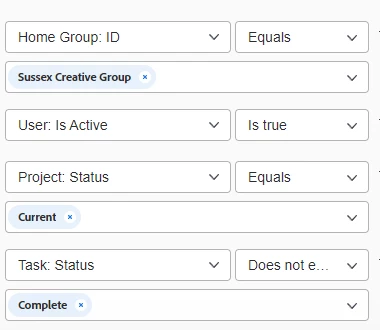
Hi, I have the below filter set with these filters included that I want to use from the /resourcemanagement/scheduling page (waffle > Resourcing > Workload Balancer). I want to pull in work assigned to anyone in this particular home group. When I save and apply the filter, it is still showing me a ton of people that do not belong to this Home Group. I want to use this option instead of having all the users in this Group as part of a Team/using the balancer from the Team page for certain reasons. Is this a bug that it's pulling many people outside of this Group? I've already verified they are definitely not part of this group. Would like to use this filter instead of 'assigned to' and list out each name since this is a large group and it will be less upkeep if I just associate it with home group instead of individual users. 'Assignment users' isn't a filter option either, only has 'assigned to' so I don't want to go that route at all. Thoughts?
 

This post is no longer active and is closed to new replies. Need help? Start a new post to ask your question.
Best answer by J_Mas

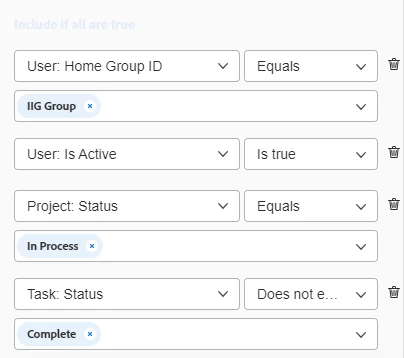
Hey @madalyn_destafney, I noticed that your Home Group ID filter says "Home Group: ID". Have you tried "User: Home Group ID" instead?

1 reply

J_Mas
J_MasAccepted solution
Level 5
July 11, 2023

Hey @madalyn_destafney, I noticed that your Home Group ID filter says "Home Group: ID". Have you tried "User: Home Group ID" instead?

Madalyn_Destafney
Community Advisor
Community Advisor
July 11, 2023

That was it! When I initially searched for user home group it wasn't pulling in the options for me, so had used the other one. Comes up when I add in the colon after 'User:' though. I wonder what the Home Group filter I originally used is even supposed to be pulling then... 

If this helped you, please mark correct to help others : )
J_Mas
Level 5
July 11, 2023

That's interesting. I couldn't get "Home Group: ID" to show up when I tested it. I'm also curious what that actually refers to. 🤔 🤔