fusion email body content | Adobe Higher Education
Skip to main content
Level 4
March 2, 2023
解決済み

fusion email body content

  • March 2, 2023
  • 1 の返信
  • 838 ビュー

Good Day,


Is there a way to add image on the email body content in fusion? 
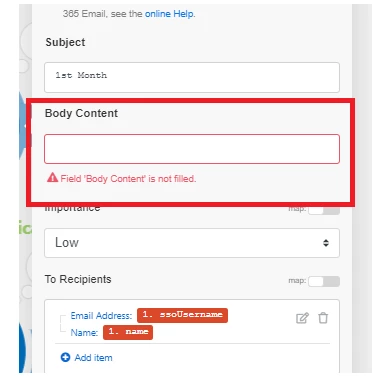
or how do we embed images in this area?

このトピックへの返信は締め切られました。
ベストアンサー Richard_Le_

Hi,


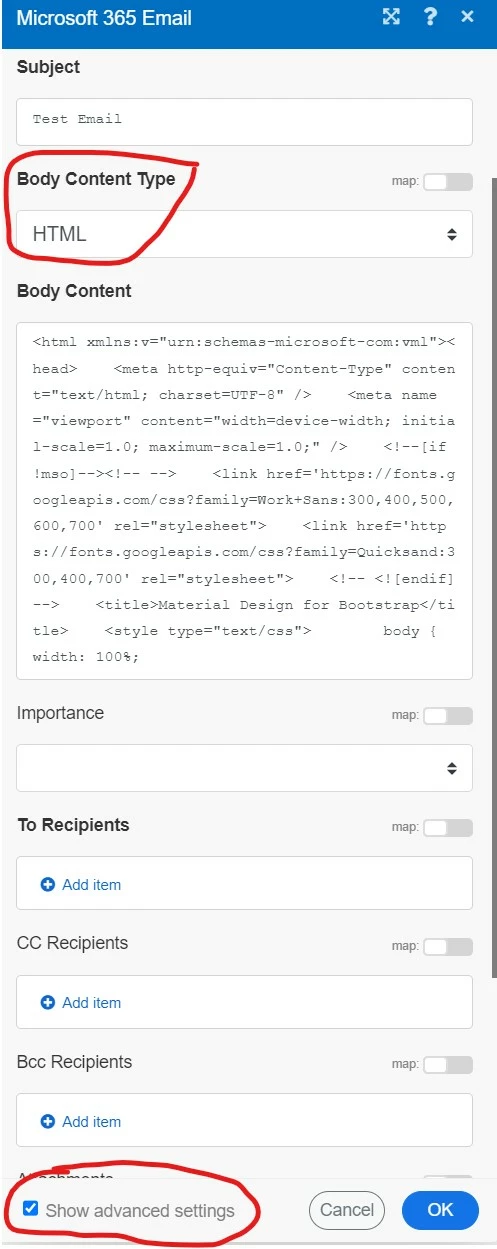
You would need to construct your email out of HTML in order to embed images. At the bottom of the email module settings check "show advanced settings", once checked you can set the body content type to HTML. Then simply paste your HTML into the body content field.
 

Best Regards,

Rich. 

1 の返信

Community Advisor
March 2, 2023

Hi,


You would need to construct your email out of HTML in order to embed images. At the bottom of the email module settings check "show advanced settings", once checked you can set the body content type to HTML. Then simply paste your HTML into the body content field.


Best Regards,

Rich. 

A_EN作成者
Level 4
March 2, 2023

Hi @richard_le_ 


I appreciate your response. Yes, I did, but my source image banner is not showing on emails. Where do you suggest to house and call those source image?


This big white portion should be my banner but I'm not getting anything


Rafal_Bainie
Community Advisor
Community Advisor
March 2, 2023

I don't know what the best way to do it is, but pictures I use in custom emails from Fusion are hosted on Banana tag server (it's email distribution app). We figured out that once you create an email in this app, even only in draft form it saves the picture to their server and url remains valid almost indefinitely. 
This is our solution, but I guess any online location with open access will work, at the same time I'm pretty sure hosting in Workfront won't work.

Before Banana tag we used internal server to host the pictures, since our custom email are distributed within organization alone that was working well for quite some time.