Filters and Views Applied on Dashboard Reports | Community
Skip to main content
Level 2
December 13, 2024
Solved

Filters and Views Applied on Dashboard Reports

  • December 13, 2024
  • 3 replies
  • 894 views

I have built several Dashboards for teams but the filters needed to view the reports never seem to stay on the Dashboard. I get regular complaints that the teams have to remember which views to choose when they go to the Dashboard to view all the reports.  How can I get these to remain permanent for all the Dashboards and reports I create?


Thank you
This post is no longer active and is closed to new replies. Need help? Start a new post to ask your question.
Best answer by KellieGardner

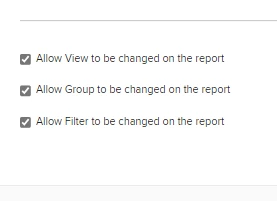
When I create reports for dashboards, I change the settings so that the filters views and groupings can not be changed. This way the report will always default to how it's been built. 


You can uncheck these boxes from report settings. 


3 replies

RandyRoberts
Community Advisor
Community Advisor
December 13, 2024

Reports use the last filter, view and grouping that the user selected for that report.

In contrast, and my experience, reports on dashboards always default to the default filter, view and grouping even if I previously selected a custom one.

For example, you can go to any freestanding task report (not in a dashboard) and select a filter or view. Then, you can navigate somewhere else and come back to that report, and it will still use the filter or view you previously selected. When I do the same thing in a dashboard, it always reverts back to the default when I return even after I previously after selected a filter or view.

I suggest making the filter, view and grouping you want people to see the default.

TIP: if this solved your problem, I invite you to consider marking it as a Correct Answer to help others who might also find it of use.
If you like my content, please take a moment to view and vote on my Idea Requests: https://tinyurl.com/mysocalledideas


KellieGardner
Community Advisor
KellieGardnerCommunity AdvisorAccepted solution
Community Advisor
December 13, 2024

When I create reports for dashboards, I change the settings so that the filters views and groupings can not be changed. This way the report will always default to how it's been built. 


You can uncheck these boxes from report settings. 


AngieH1Author
Level 2
December 13, 2024

Not sure why but I did follow this and like it! But when I applied it, they did not stick on the report I pulled into the Dashboard.   It doesn't allow me to make my created filters/views the default.  How do you make your custom filters a default?

Rafal_Bainie
Community Advisor
Community Advisor
December 13, 2024

I follow similar process as Kellie mentioned. For majority of the reports I have them configured without options to adjust views/groupings/filters. 
Report "consumers" are not expected to be reporting experts and having to configure them additionally.

AngieH1Author
Level 2
December 13, 2024

wooohoo!!   This is exactly what I needed.