External lookup - passing dependency using Workfront Planning api | Community
Skip to main content
Kurt_Jones
Community Advisor and Adobe Champion
March 30, 2026
Solved

External lookup - passing dependency using Workfront Planning api

  • March 30, 2026
  • 1 reply
  • 32 views

I’m trying to create two external lookup fields that are using the Workfront Planning api to pull data from Planning.  I’ve created my first lookup fine and its pulling my Planning fieldId with the records I want to show users.  The fieldId output from this first field will drive what records a user sees in the second external field.  The Workfront Planning api uses JSON for filtering, which is curly brackets, and the dependency field needs curly brackets around the field you need the dependent output from.  What’s happening is when I try to build the filtering for the 2nd external field to use the output I need, it needs to be written in JSON so the dependency field is put everything in curly bracket if that dependency field, which obviously is not working.  Has anyone worked with Planning api within an external field to get a dependency, coming from another Planning field to work?  Any insight, ideas, or thoughts would be appreciated.
Best answer by Kurt_Jones

Nico,

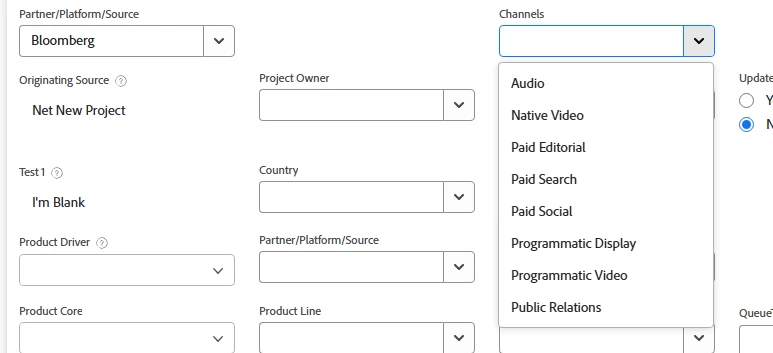
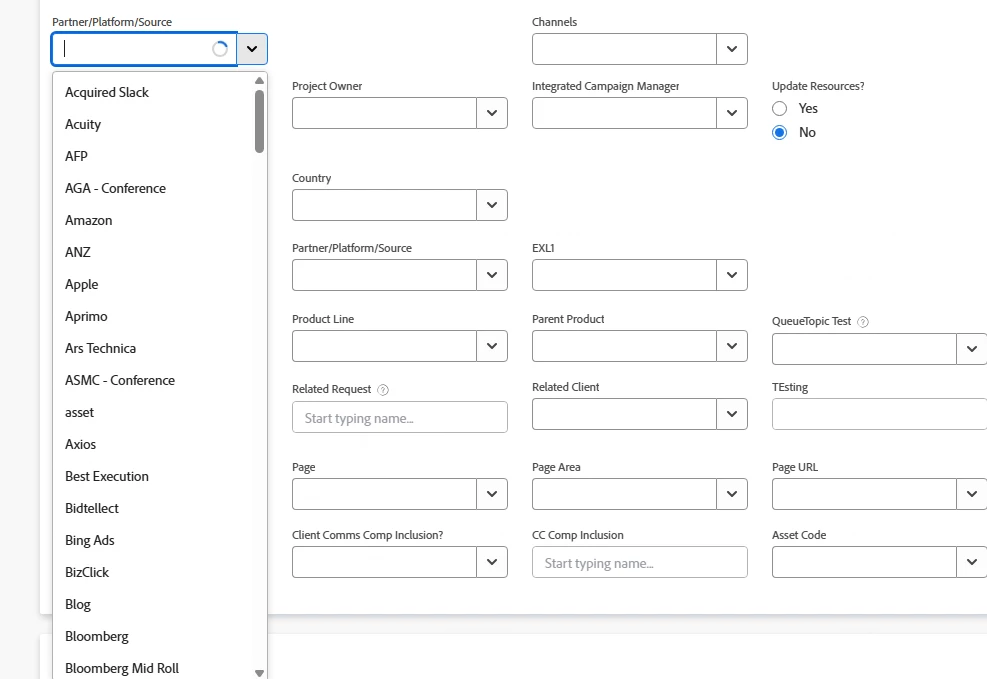
I worked with support on this one but the jsonpath only supports simple data so I could not do what I wanted with the Planning api. Instead, I had to build a project with summary and child tasks to make the fields do I want needed.  Below is visuals of what I did:


The first field is a list of all the platforms we distribute on.  I had built this table in Planning and wanted to use the value chosen in this field to show only the items related to its value in the second field, called Channels.


In the second visual, I’ve chosen a value in the first field and only the values associated with that first field show in the Channels field.  In Planning, what I had was a table with all the Platform and a table with all the Channels.  I then created a 2nd column in the Platform table that was an existing connection, with multi select, to the Channels record.  That allowed me to associate a Platform like Bloomberg with the Channels we use with them.  However, in Planning this creates arrays and the jsonpath in external lookup can’t handle that so I scrapped both tables.  Instead, to get what you see above, I made a project, placed all the Platforms as Summary tasks and manually added the Channels under each Summary task.  That allows me to use the Workfront api which is a bit more flexible with the query string.

1 reply

ninoskuflic
Level 4
April 9, 2026

Hi ​@Kurt_Jones, did you try to put the data in the calculated field to do some sort of data manipulation over there and then use that as a dependency for the 2nd lookup field? Can you show also the examples of the 2 data fields / values? 😁

If this solved your issue, please mark it as solved so others can find the solution faster.
Kurt_Jones
Community Advisor and Adobe Champion
Kurt_JonesCommunity Advisor and Adobe ChampionAuthorAccepted solution
Community Advisor and Adobe Champion
April 9, 2026

Nico,

I worked with support on this one but the jsonpath only supports simple data so I could not do what I wanted with the Planning api. Instead, I had to build a project with summary and child tasks to make the fields do I want needed.  Below is visuals of what I did:


The first field is a list of all the platforms we distribute on.  I had built this table in Planning and wanted to use the value chosen in this field to show only the items related to its value in the second field, called Channels.


In the second visual, I’ve chosen a value in the first field and only the values associated with that first field show in the Channels field.  In Planning, what I had was a table with all the Platform and a table with all the Channels.  I then created a 2nd column in the Platform table that was an existing connection, with multi select, to the Channels record.  That allowed me to associate a Platform like Bloomberg with the Channels we use with them.  However, in Planning this creates arrays and the jsonpath in external lookup can’t handle that so I scrapped both tables.  Instead, to get what you see above, I made a project, placed all the Platforms as Summary tasks and manually added the Channels under each Summary task.  That allows me to use the Workfront api which is a bit more flexible with the query string.

If my response answered your question, please mark it answered, so others can find the answer