
exported Excel reports--percentages formatted as text | Community
Skip to main content
KristenS_WF
Level 7
December 9, 2024
Question

exported Excel reports--percentages formatted as text

  • December 9, 2024
  • 1 reply
  • 571 views

Hi All,

I just noticed something buggy, and I'm trying to figure out if it's WF or Excel.

I've noticed that when I export task reports that include the Percent Complete field, the field is now getting shown in Excel as text rather than a number/percentage (this is causing problems when we run saved import operations in MS Access).

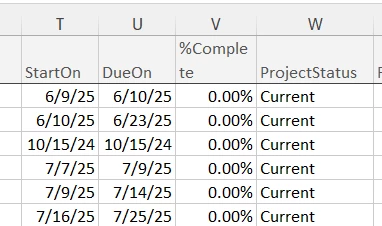
This is how the field was previously formatted:
This is how the export from WF now formats the field:
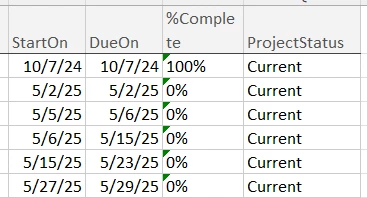
(The flags are the 'The number in this cell is formatted as text or preceded by an apostrophe' error.)

The first screenshot is from a report exported on 12/3; the second is from a report exported on 12/6, so the issue started mid/late last week.

Does anyone know how this issue originated?  I know some WF release features were rolled out 12/5, but I don't see anything that might be related to this issue.  I'm trying to figure out if the change was on WF or Excel's end.

Thanks.


This post is no longer active and is closed to new replies. Need help? Start a new post to ask your question.

1 reply

skyehansen
Community Advisor and Adobe Champion
December 9, 2024

As a workaround, what do you think about maybe editing that report and changing the percent complete column to text mode? Change the valueformat to HTML and then try exporting this.

KristenS_WF
Level 7
December 9, 2024

It does get rid of the Excel text formatting, but unfortunately when marking it as a percentage in Access, it increases the value (e.g., 100% in WF becomes 10000% in Access).

I think I can import to a temporary table (as a text field) and then append that data to a table where the value is double/percent.  I've done that before for fields where values are not always present (e.g., a date custom field where not all records are populated), but it's just irksome that this has suddenly changed.

Thanks for the suggestion.