Error Message when using percentage slider to complete a task | Community
Skip to main content
Level 2
June 19, 2025
Solved

Error Message when using percentage slider to complete a task

  • June 19, 2025
  • 1 reply
  • 414 views

When in a project if I complete a task, that has an auto approval process on it, by just putting 100 into the percent complete box and hitting enter, it works.

However some team members have been completing tasks another way that started causing an error message to pop up.

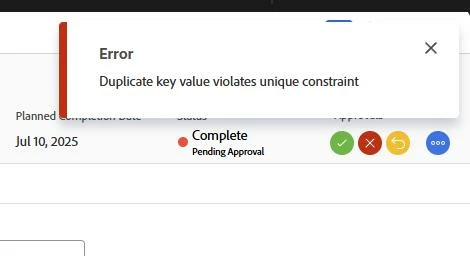
Error message says "Error Duplicate key value violates unique constraint".


They are going into the task (w/the auto process) and then clicking on the "percentage slider" button and moving it to 100%. It still works but this message is popping up now and they are constantly having to close the error message.
Best answer by skyehansen

I would get someone to clear cache and cookies and if it still happens, you should submit a case to Support. Are you on fast release? They just changed this functionality last week and it could be causing some problems. 

1 reply

skyehansen
Community Advisor and Adobe Champion
skyehansenCommunity Advisor and Adobe ChampionAccepted solution
June 19, 2025

I would get someone to clear cache and cookies and if it still happens, you should submit a case to Support. Are you on fast release? They just changed this functionality last week and it could be causing some problems. 

Level 2
June 23, 2025

Thanks for the reply. We ended up submitting a support ticket, they are still looking into it.

What is fast release? i know we get to demo the new updates before they are made final, is that what you are talking about?