Document link within Task Report | Community
Skip to main content
AndyKent
Level 2
February 19, 2024
Solved

Document link within Task Report

  • February 19, 2024
  • 1 reply
  • 1219 views

Hi,


I'm using the following textmode to bring in nested documents within a project.

listdelimiter=<hr>
listmethod=nested(project).nested(documents).lists
name=Project Docs
stretch=0
type=iterate
valueexpression=CONCAT({name})
valueformat=HTML


The stakeholder has requested the name of the doc to be a link, how do I go about including this?



Thanks
This post is no longer active and is closed to new replies. Need help? Start a new post to ask your question.
Best answer by Scott_Goodwin

Hello @andykent 

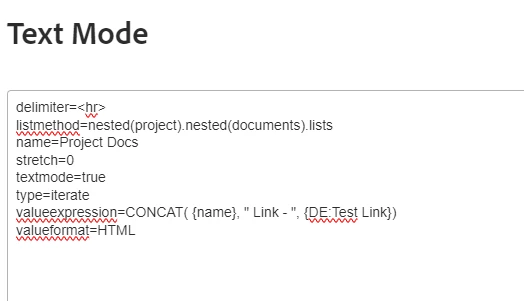
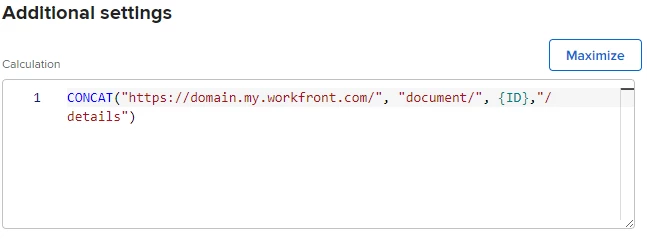
Ive had a go at this one. So ive added a custom form to the Document that calculates the URL for you.

I then CONCAT that link to the name in the report column

it adds the link after the name in the report.

I'm not sure if there is a nicer way to show the name as clickable link. I couldn't get that to work. But this at least allows you to navigate to the document from the report. 

Hope that helps.

1 reply

Scott_Goodwin
Scott_GoodwinAccepted solution
Level 3
February 19, 2024

Hello @andykent 

Ive had a go at this one. So ive added a custom form to the Document that calculates the URL for you.

I then CONCAT that link to the name in the report column

it adds the link after the name in the report.

I'm not sure if there is a nicer way to show the name as clickable link. I couldn't get that to work. But this at least allows you to navigate to the document from the report. 

Hope that helps.

AndyKent
AndyKentAuthor
Level 2
February 19, 2024

Thanks @scott_goodwin 

Think I got it using your first screen grab...

listdelimiter=<hr>
listmethod=nested(project).nested(documents).lists
name=Documents
stretch=100
textmode=true
type=iterate
valueexpression=CONCAT({name}, " - ", "http://XXXXX.my.workfront.com/", "document/", {ID}, "/details")
valueformat=HTML