Custom Form Calculation | Community
Skip to main content
Level 2
February 20, 2025
Solved

Custom Form Calculation

  • February 20, 2025
  • 2 replies
  • 649 views

Hi,

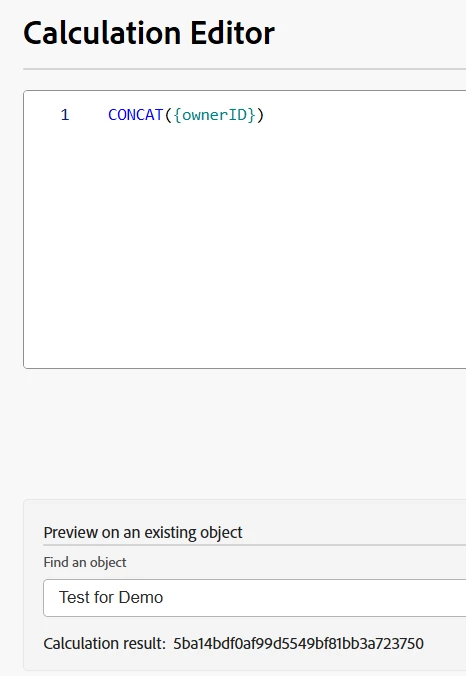
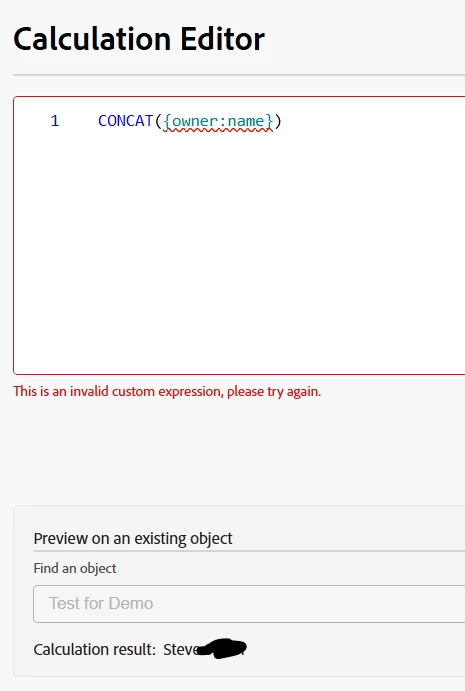
I'm trying to pull the project owner name into a custom field on a form.  Owner name is not an option in the fields, but ownerID is.  I was able to use syntax for the name and it shows it in the calculation result (see image) but gives an error and won't let me save the expression.

Any ideas on how to bring in the owner name into a field?


This post is no longer active and is closed to new replies. Need help? Start a new post to ask your question.
Best answer by JustinRenteria2

Hi, for custom expressions you need to use a period instead of a colon. You also have to introduce the brackets.
The calculation should read:
CONCAT({owner}.{name})

2 replies

Alex_Di
Level 3
February 20, 2025

Hi HeatherSc2, 


You didn't indicate if this was a Project form, but you have CONCAT at the beginning but that is not formatted correctly.  Try just 
={project:owner:name}

Level 2
February 20, 2025

Hi Alex,

Thanks.  It is a project form.  I did try that at first but when it gave the error I thought maybe it needed a command so I added the concat.  The concat does work for the owner id field so I don't think it is that syntax.

It is telling me that owner name is not a field in my system but I have used that field in reports and it will show in the preview of an existing project. 😞


JustinRenteria2
JustinRenteria2Accepted solution
Level 6
February 20, 2025

Hi, for custom expressions you need to use a period instead of a colon. You also have to introduce the brackets.
The calculation should read:
CONCAT({owner}.{name})

JustinRenteria2
Level 6
February 20, 2025

here's an article that explains the difference between the syntax and when to use what:

https://experienceleague.adobe.com/en/docs/workfront/using/reporting/reports/calculated-custom-data/calculated-data-expressions

Level 2
February 20, 2025

Perfect!  That worked.  And thank you for the article!