Creative Director Dashboard Conundrum | Community
Skip to main content
Level 2
June 24, 2026
Solved

Creative Director Dashboard Conundrum

  • June 24, 2026
  • 3 replies
  • 86 views

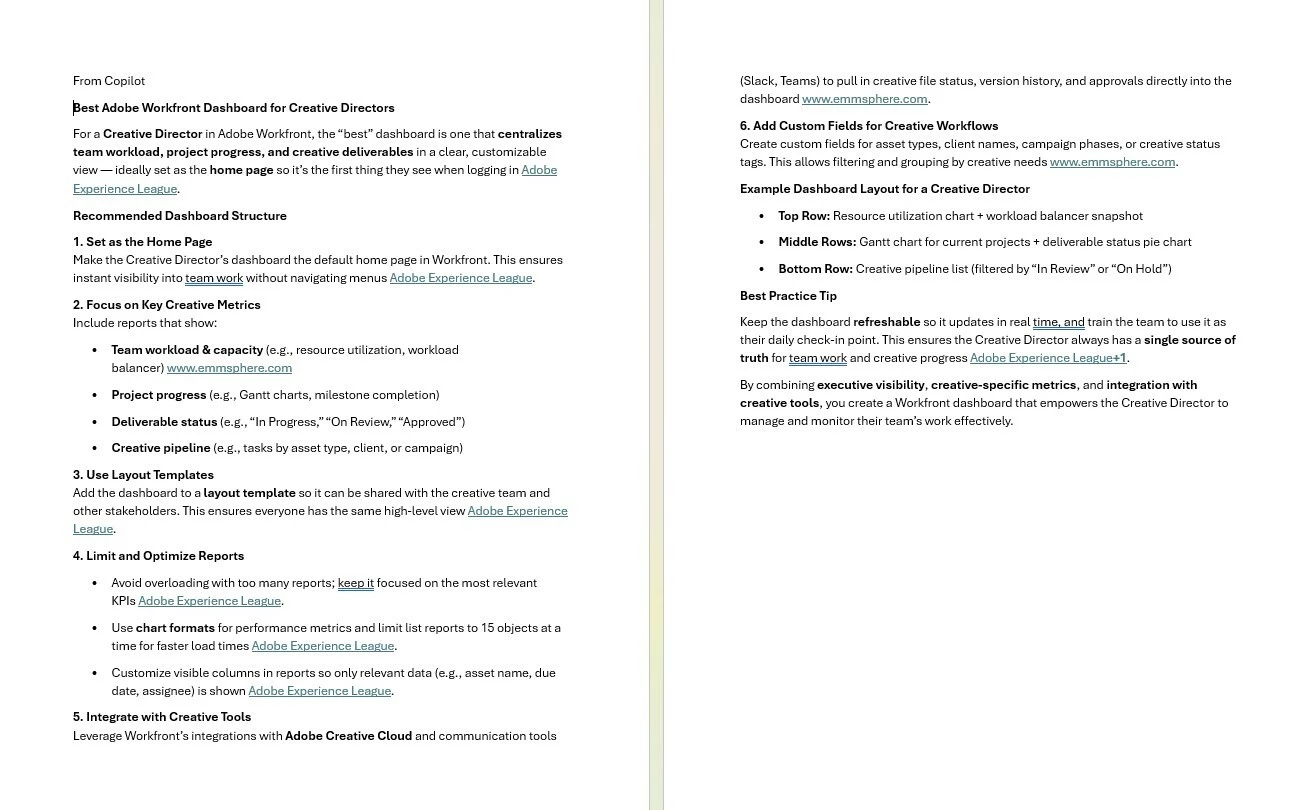
I have a new creative director and would love to provide him with a comprehensive dashboard to manage his three direct reports. I popped into Copilot what was the best Adobe Workfront Dashboard for Creative Directors would be, and it replied: 


For a Creative Director in Adobe Workfront, the “best” dashboard is one that centralizes team workload, project progress, and creative deliverables in a clear, customizable view — ideally set as the home page so it’s the first thing they see when logging in Adobe Experience League.


But when I tried to follow the “step-by-step” instructions, I get a bit lost. I will try to pop the same question into the Adobe AI Assistant to see if it can help me. But would LOVE anyone’s thoughts on a Creative Director Dashboard! I placed the image of the directions for reference.
 

Thanks! ​

    Best answer by StutiTi

    Hi ​@BrynaJJ , since the Creative Director only needs visibility into tasks (not projects or issues), and wants to see each designer's work individually, a Task report grouped by Assigned To is the core of this dashboard. Filter it to show tasks belonging to projects owned by or assigned to his three direct reports, with a status filter excluding Complete and Cancelled. Group by Assigned To Name and then by Project Name so he can see each designer's workload at a glance.

    A few reports to consider putting on the dashboard:

    The first is an "Active Tasks by Designer" report , a task report filtered to his team's tasks, grouped by Assigned To, showing Planned Completion Date, Status, and Percent Complete. This gives him the day-to-day view he's looking for.

    The second is a "Tasks Due This Week" report, same base filter but with a Planned Completion Date filter set to the current week. This keeps the focus on what's urgent.

    The third is a "Late Tasks" report, tasks where the Planned Completion Date is past today and Status is not Complete. This is useful for a quick check-in conversation.

    Since you mentioned you'd like to add milestones eventually, I'd hold off on a milestone report for now and revisit once those are built into the project templates as it'll be much more useful then.

    To get started quickly, also check the Blueprints in Setup (Setup > Blueprints) and filter by Marketing Creative, there are some pre-built report and dashboard sets that may get you 80% of the way there without starting from scratch.

    3 replies

    Lyndsy-Denk
    Community Advisor
    Community Advisor
    June 25, 2026

    These directions are less step-by-step and more a list of different features and functions you can use to build more specific tools. Additionally, the answer is broader than what I think you wanted. That might be why you’re swirling. For example, in order for you to set a dashboard as a home page (#1), you have to build the reports and the dashboard first. And #3 gives you no recommendations for what your layout templates might look like for your audience.

    As a beginner, I would check out Blueprints and see if there are any reports and dashboards that get you most of the way there. There’s a filter specifically to look at Blueprints for Marketing Creative.

    BrynaJJAuthor
    Level 2
    June 25, 2026

    Fantastic, thank you so much!!!

    DeborahLeigh123
    Level 4
    June 26, 2026

    Greetings! In order to give you a few suggestions, I have a few follow up questions:

    1. What objects do they own? (Projects, Tasks, Issues/Requests)
    2. Do you use a calendar for anything?
    3. Do your projects have milestones built into them?
    4. Is the team using a Board?
    5. Do they use any ongoing projects that stay open?

    Let me know the answers to the above, and I can give you a few suggestions. 

    BrynaJJAuthor
    Level 2
    June 26, 2026

    Hi There! Here are the answers:

    1. What objects do they own? (Projects, Tasks, Issues/Requests)]
      1. Tasks Only
    2. Do you use a calendar for anything?
      1. The director prefers to see each designer’s individual tasks
    3. Do your projects have milestones built into them?
      1. No, but I need to! I just have the main tasks with subtasks, and they track the subtasks.
    4. Is the team using a Board?
      1. No, they don’t like Boards.
    5. Do they use any ongoing projects that stay open?
      1. No, their projects close...no on-going projects for them.

    Thank you for your help!

    StutiTiAdobe SupportAccepted solution
    Adobe Support
    June 29, 2026

    Hi ​@BrynaJJ , since the Creative Director only needs visibility into tasks (not projects or issues), and wants to see each designer's work individually, a Task report grouped by Assigned To is the core of this dashboard. Filter it to show tasks belonging to projects owned by or assigned to his three direct reports, with a status filter excluding Complete and Cancelled. Group by Assigned To Name and then by Project Name so he can see each designer's workload at a glance.

    A few reports to consider putting on the dashboard:

    The first is an "Active Tasks by Designer" report , a task report filtered to his team's tasks, grouped by Assigned To, showing Planned Completion Date, Status, and Percent Complete. This gives him the day-to-day view he's looking for.

    The second is a "Tasks Due This Week" report, same base filter but with a Planned Completion Date filter set to the current week. This keeps the focus on what's urgent.

    The third is a "Late Tasks" report, tasks where the Planned Completion Date is past today and Status is not Complete. This is useful for a quick check-in conversation.

    Since you mentioned you'd like to add milestones eventually, I'd hold off on a milestone report for now and revisit once those are built into the project templates as it'll be much more useful then.

    To get started quickly, also check the Blueprints in Setup (Setup > Blueprints) and filter by Marketing Creative, there are some pre-built report and dashboard sets that may get you 80% of the way there without starting from scratch.

    BrynaJJAuthor
    Level 2
    June 29, 2026

    Amazing thank you!! I had only “current” tasks then “all tasks” and that did not help him...so this is perfect!! Will work on this tonight!! Thank you so much!