
Create Report to see which Layout Template is assigned to which user | Community
Skip to main content
lgaertner
Level 9
September 9, 2022
Solved

Create Report to see which Layout Template is assigned to which user

  • September 9, 2022
  • 2 replies
  • 783 views

Hello,

is it somehow possible to create a new report which shows, which Layout template is assigned to our users?


Thanks in advance.


Regards

Lars

This post is no longer active and is closed to new replies. Need help? Start a new post to ask your question.
Best answer by RandyRoberts

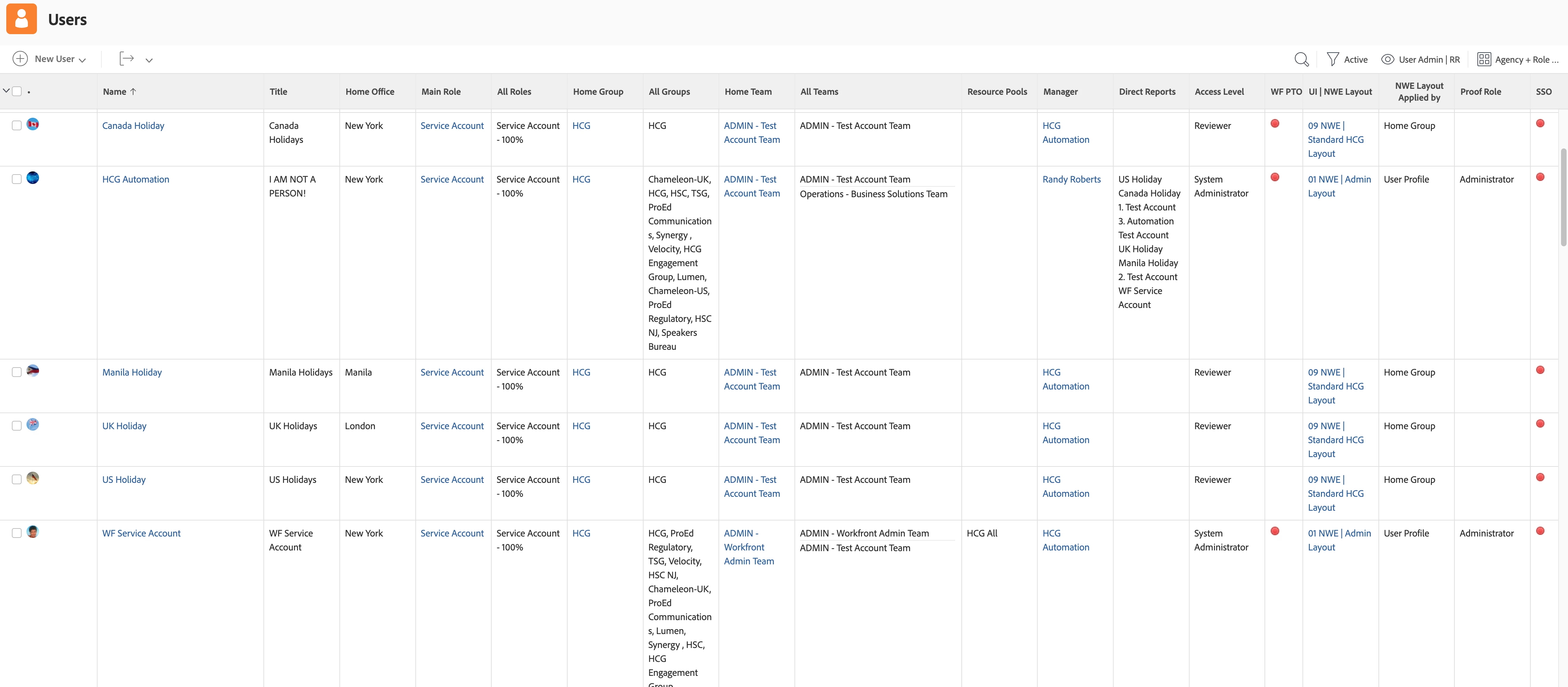
I use "effectiveUITemplate:name" to get the name of the assigned layout and the following to show how it was assigned; by user, team, group, etc.


displayname=NWE Layout Applied by
textmode=true
valueexpression=IF(!ISBLANK({uiTemplate}),"User Profile",IF(ISBLANK({uiTemplate})&&!ISBLANK({role}.{uiTemplate}),"Primary Role",IF(ISBLANK({uiTemplate})&&ISBLANK({role}.{uiTemplate})&&!ISBLANK({homeTeam}.{uiTemplate}),"Home Team",IF(ISBLANK({uiTemplate})&&ISBLANK({role}.{uiTemplate})&&ISBLANK({homeTeam}.{uiTemplate})&&!ISBLANK({homeGroup}.{uiTemplate}),"Home Group"))))
valueformat=HTML
2 replies

Community Advisor
September 9, 2022

Yes, you can add Layout Template > Name as a column to a User report. You can also add it to a custom view in Users. 🙂

RandyRoberts
Community Advisor
RandyRobertsCommunity AdvisorAccepted solution
Community Advisor
September 9, 2022

I use "effectiveUITemplate:name" to get the name of the assigned layout and the following to show how it was assigned; by user, team, group, etc.


displayname=NWE Layout Applied by
textmode=true
valueexpression=IF(!ISBLANK({uiTemplate}),"User Profile",IF(ISBLANK({uiTemplate})&&!ISBLANK({role}.{uiTemplate}),"Primary Role",IF(ISBLANK({uiTemplate})&&ISBLANK({role}.{uiTemplate})&&!ISBLANK({homeTeam}.{uiTemplate}),"Home Team",IF(ISBLANK({uiTemplate})&&ISBLANK({role}.{uiTemplate})&&ISBLANK({homeTeam}.{uiTemplate})&&!ISBLANK({homeGroup}.{uiTemplate}),"Home Group"))))
valueformat=HTML

ChloeWY
Level 6
September 15, 2022

This is really helpful, thank you for sharing!