Conditional formatting based on Condition and Percent Complete | Community
Skip to main content
Level 2
February 24, 2025
Solved

Conditional formatting based on Condition and Percent Complete

  • February 24, 2025
  • 1 reply
  • 679 views

Hi Community

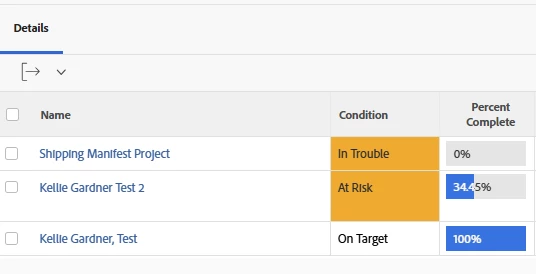
I've created a project report that highlights projects where the condition is 'At Risk' in orange or any that are 'In Trouble' in red. However, this should only be applied to incomplete projects (where Percent Complete < 100).


So, the one At Risk should be highlighted orange but the one In Trouble should not be highlighted red, as Percent Complete = 100.


None of the other rows should be highlighted, as they're On Target.
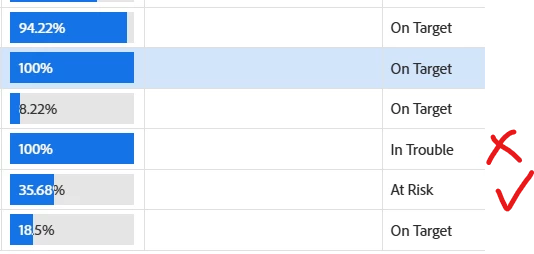
 

I've tried various combinations of cases in the text editor, without success. Any help would be appreciated..


thanks

Tony
Best answer by KellieGardner

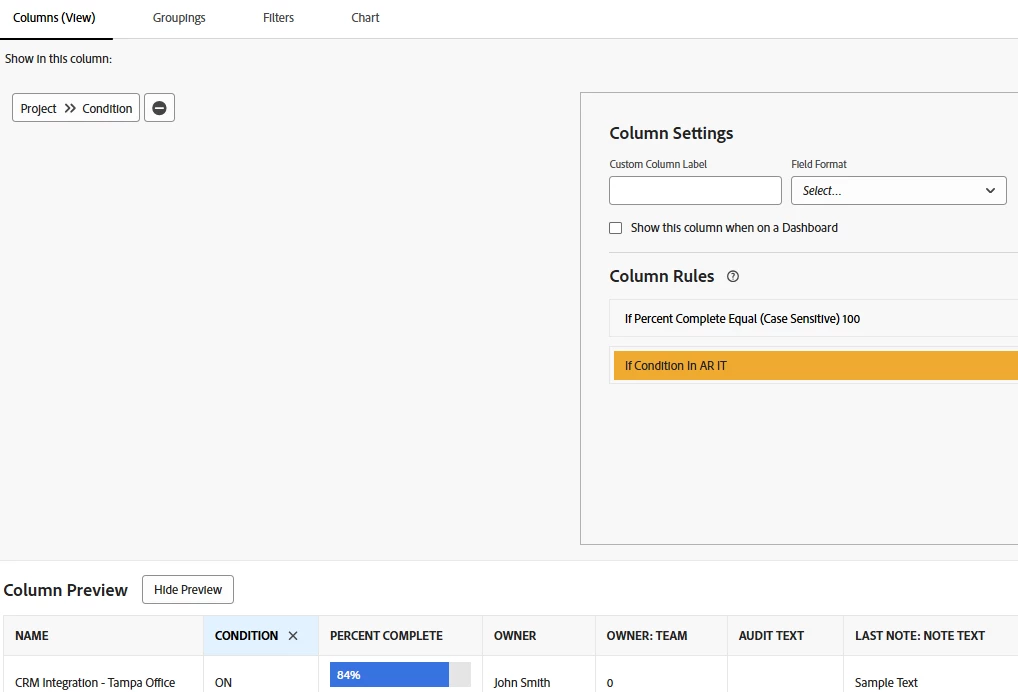
So you can trick the system with conditional formatting by setting up 2 conditional statements. Workfront will go down the list and apply the first format and then the second format.


Set your first condition to color the completed projects white, then set your second condition to color the at risk or in trouble projects.


1 reply

KellieGardner
Community Advisor
KellieGardnerCommunity AdvisorAccepted solution
Community Advisor
February 24, 2025

So you can trick the system with conditional formatting by setting up 2 conditional statements. Workfront will go down the list and apply the first format and then the second format.


Set your first condition to color the completed projects white, then set your second condition to color the at risk or in trouble projects.


tlangfordAuthor
Level 2
February 24, 2025

It's easy when you know how 😏


Thanks!

KellieGardner
Community Advisor
Community Advisor
February 24, 2025

Took some trial and error over the years. Even if you are new, you'll get there. It calls out the order on the documentation page but doesn't explain how you can use it for something like this very well. It's kind of similar to Excel conditional formatting.


Rules are applied in the order that they were created. They are combined but they do not overwrite each other..