Change Task Column Heading Name | Community
Skip to main content
Level 2
April 24, 2025
Solved

Change Task Column Heading Name

  • April 24, 2025
  • 1 reply
  • 535 views

Hello,


Is it possible to change the name of a task column heading or a create custom heading to the schedule?


Thanks!


Andrew.


Best answer by KierstenKollins

Yes. Assuming you are in the project area, go to the view settings in the Tasks area, go to the description field per your example, switch it to text mode and add the following:


displayname=custom name here
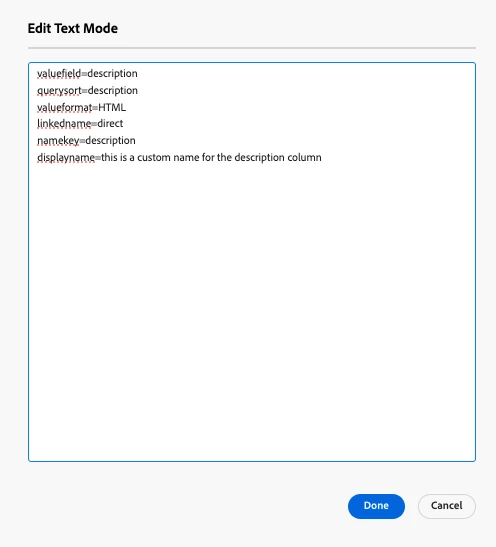
 

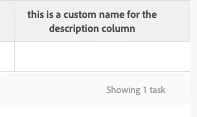
Save the code and save the view and you should see the change reflected in the column header.
1 reply

KierstenKollins
Community Advisor
KierstenKollinsCommunity AdvisorAccepted solution
Community Advisor
April 24, 2025

Yes. Assuming you are in the project area, go to the view settings in the Tasks area, go to the description field per your example, switch it to text mode and add the following:


displayname=custom name here


Save the code and save the view and you should see the change reflected in the column header.

AndrewHe2Author
Level 2
April 24, 2025

How do I view settings and switch to text mode?

KierstenKollins
Community Advisor
Community Advisor
April 24, 2025

1 - Click on the Eyeball icon

2 - Select the view that you would like to edit by clicking on the pencil icon (not shown below but will be to the right when hovering over)


3 - Within the view, click on your Description Field

4 - Switch to Text Mode


 5 - Click Edit Text Mode

6  -  Add the displayname= Your custom name here code. Then hit Done. 

7 - Then save view