Calendar Week View Question: Multi-day task duration shows incorrect in the Calendar
Hello,
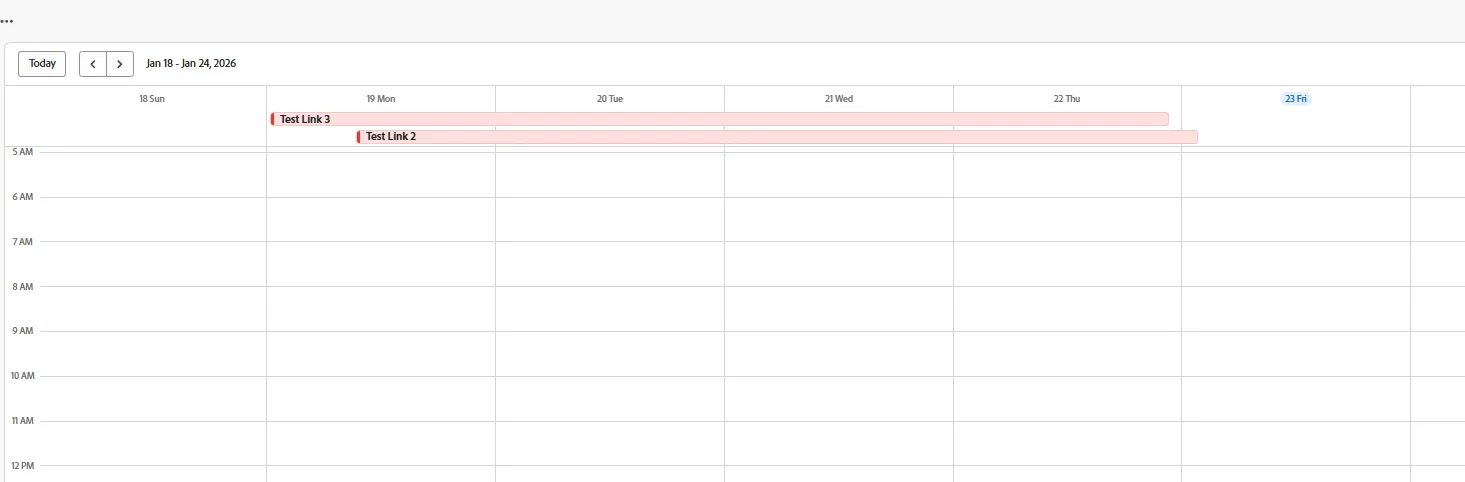
I'm having trouble about how the week view in the calendar calculates and displays the duration for multi-day tasks, use custom dates as start date and finish date.
I've set up two test schedules with different end times, and they are displayed in a way I did not expect.我很难理解日历中的周视图如何计算和显示多日项目的持续时间。我设置了两个不同结束时间的测试时间表,它们的显示方式出乎我的意料。
Test Case 1: Schedule 'Testline2'测试用例1:计划“Testline2”
Set Start/End: Jan 19, 2026, 9:00 AM to Jan 22, 2026, 5:00 PM (within the configured working hours).设置开始/结束:2026年1月19日上午9:00至2026年1月22日下午5:00(在配置的工作时间内)。设置开始/结束:2026年1月19日上午9:00至2026年1月22日下午5:00(在配置的工作时间内)。
Expected Display: Should span four days: 19th, 20th, 21st, and 22nd.预计展期:19日、20日、21日、22日四天。
Actual Display: In the week view, its bar visually extends to cover Jan 23rd as well, spanning an extra day.
Test Case 2: Schedule 'Testlink3' (for comparison) Same date but different end time
Set Start/End: Jan 19, 2026, 12:00 AM to Jan 22, 2026, 11:00 PM.
Expected Display: Should also span the same four days.
Actual Display: Its bar correctly ends on Jan 22nd, as expected.
实际显示:在周视图中,它的栏在视觉上延伸到1月23日,跨越了额外的一天。
My Question: 我的问题:
Why would Testline2, which ends at 5:00 PM (during working hours), appear to extend into the 23rd, while Testlink3, which ends later at 11:00 PM, displays correctly on the 22nd? Is there a specific logic or setting in the week view that calculates the visual end date differently?
Has anyone else observed this behavior or can shed some light on the rules the week view uses for drawing multi-day items? Any insights would be greatly appreciated.
Thank you in advance for your help!