Calculated Field Referencing Multi-Select Checkbox Field | Community
Skip to main content
February 8, 2022
Solved

Calculated Field Referencing Multi-Select Checkbox Field

  • February 8, 2022
  • 4 replies
  • 1177 views

I have a multi-select checkbox field (let's call it "Field 1") with three choices: Team A, Team B, Team C.

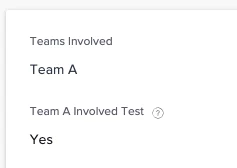
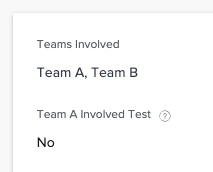
I'm trying to make a calculated field ("Field 2") that references Field 1, returning a true expression whenever Team A is selected in Field 1 (regardless of whether the other options are also selected).

I've tried various forms of IF, IFIN, IN, etc, but I am only able to return a true expression when only Team A is selected in Field 1. If multiple selections are made in addition to "Team A", I'm getting the false expression.

One example of a calc I've tried (have tried a few and scrapped):

IFIN(Teams Involved,"Team A","Yes","No")

At this point, "why" I was doing this is moot, but I still want to know what's going on and if there's a proper calculation to use for this scenario.
Can anyone help here?

This post is no longer active and is closed to new replies. Need help? Start a new post to ask your question.
Best answer by William

Hi Ashley, have you tried a CONTAINS?

IF(CONTAINS("Team A",Teams Involved),"Yes","No")

4 replies

asadamAuthor
February 8, 2022

@Doug Den Hoed‚ @William English‚ can either of you help with this one? I hope I'm just doing something silly and don't need to account for sorting or something :)

William
Community Advisor
WilliamCommunity AdvisorAccepted solution
Community Advisor
February 8, 2022

Hi Ashley, have you tried a CONTAINS?

IF(CONTAINS("Team A",Teams Involved),"Yes","No")

If you like my content, please take a moment to view and vote on my Idea Requests: https://tinyurl.com/4rbpr7hf
asadamAuthor
February 8, 2022

@William English‚ well this is officially the silliest I've asked in a while! Total facepalm moment--thank you, that worked! Excuse me while I oil my rusty brain...

For my knowledge, do you know why IFIN doesn't work in this situation?

Doug_Den_Hoed_AtAppStore
Community Advisor
Community Advisor
February 8, 2022

Hi Ashley,

The IFIN syntax lets you "look for a specific value in a string of possible values", such as this:

IFIN({owner}.{name},"Jennifer Campbell","Rick Kuvec","Marketing Team","Other Teams")

Given that, it might be possible (untested) in your case to use:

IFIN("Team A",Teams Involved,"Yes","No")

Which (if it works) means that IFIN is "smart enough" to treat the Teams Involved multi-select array as if it were a string of possible values...but (if it fails) means that it isn't that smart (e.g. and is treating them as an array of strings, perhaps only ever matching on the first item in the array, which would then yield inconsistent results).

Bill's CONTAINS approach solves that neatly because CONTAINS will scan through all selected items for a match.

Regards,

Doug