Block status in issue for a user | Community
Skip to main content
Level 2
March 16, 2026
Question

Block status in issue for a user

  • March 16, 2026
  • 2 replies
  • 20 views

Hi, is there any way to show the issue’s status for a user inside the issue view but block it for the user to not be able to change it, just show the field but block it ? i tried through the layout template but you either remove it completely or show it.

thanks,

Bianca
    2 replies

    Patrick-antegma
    Level 4
    March 16, 2026

    Hi ​@biancalina,

    here are two options:


    1. Report Column (Text Mode)

    If this is in a report, you can add a column that simply displays the issue status.

    Text Mode example:

    valuefield=status
    valueformat=HTML
    displayname=Status

    or

    valueexpression={status}
    displayname=Status

    This will display the status value, but since it's a report column, users cannot edit it there.

    • Users see the status
    • Users cannot change it
    • Only works in reports
    •  

    2. Calculated Custom Field (Better for Issue View)

    If you want the status visible inside the issue details view, create a calculated custom field in a custom form.

    {status}

    To show the name, the calculated field formula should look like this with your own statuses:

    IF({status}="NEW","New",
    IF({status}="INP","In Progress",
    IF({status}="CLS","Closed",
    IF({status}="ONH","On Hold",
    IF({status}="RLV","Resolved","")))))

    Then:

    1. Add the field to the custom form

    2. Add the form to the issue

    3. Hide the native Status field in the layout template

    Now users will:

    • See the status
    • Not be able to edit it
    • See it inside the issue
    Level 2
    March 16, 2026

    thank you ​@Patrick-antegma !

    MoniqueEvans
    Community Advisor and Adobe Champion
    Community Advisor and Adobe Champion
    March 16, 2026

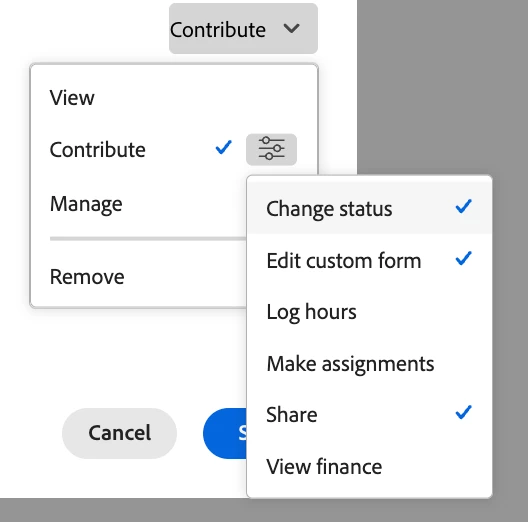
    If the user only has view access to the issue then they cannot update the status. You can also give them contribute rights and turn off the “change status” option from the advanced settings. This is done under the share button.