addMonths in calculated field | Community
Skip to main content
Level 3
April 5, 2022
Question

addMonths in calculated field

  • April 5, 2022
  • 2 replies
  • 1038 views

Has anyone used addMonths in a calculated field based on another date field?

Example: ADDMONTHS(Closing Date - Calculated;18)

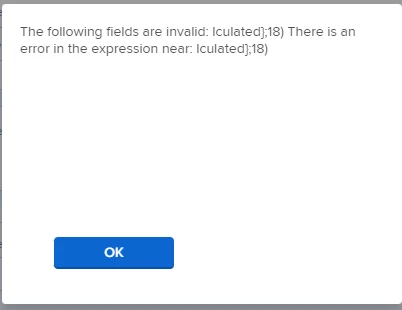
When I add this expression to the custom form I get an error. I've tried the above example as well as wrapping the field name in {}.
This post is no longer active and is closed to new replies. Need help? Start a new post to ask your question.

2 replies

NicholeVargas
Adobe Employee
Adobe Employee
April 6, 2022

Amanda - just to help clarify, are "Closing Date" and "Calculated" two different custom form fields in your system?

And what format are they? I imagine "Closing Date" is a date field, but what type of field is Calculated?

If you just wanted to calculate 18 months from the Closing Date field, you would use ADDMONTHS(Closing Date,18)

Let me know!

AmandaCrAuthor
Level 3
April 7, 2022

Nichole. Thanks for your help. It’s all one field “closing date - calculated”. I tried wrapping it in {} since it has a dash in it. No luck.

skyehansen
Community Advisor and Adobe Champion
April 7, 2022

sounds like Nichole was hinting you should use a comma rather than a semi colon?

NicholeVargas
Adobe Employee
Adobe Employee
April 7, 2022

Skye - those are GREAT steps.

Amanda - if you are unable to get the field working using the curly braces like Skye mentioned, please submit a case to Customer Support - they should be able to troubleshoot that issue!

I will also work with our internal documentation team to get any (and all) articles that reference a semi colon in the expression updated1