Adding a Custom Form to the Requests Object | Community
Skip to main content
August 31, 2023
Solved

Adding a Custom Form to the Requests Object

  • August 31, 2023
  • 2 replies
  • 2204 views

Hello,


I created a custom form and I want to add it to the Requests Object and I have selected the the "Request" option within the custom form next to the object types field, but when I go to submit a request the form does not appear as an option with the other forms. Not sure what I am doing wrong or how to get it to appear on this dropdown list. Any help would be appreciated. Thanks!
This post is no longer active and is closed to new replies. Need help? Start a new post to ask your question.
Best answer by NicholeVargas

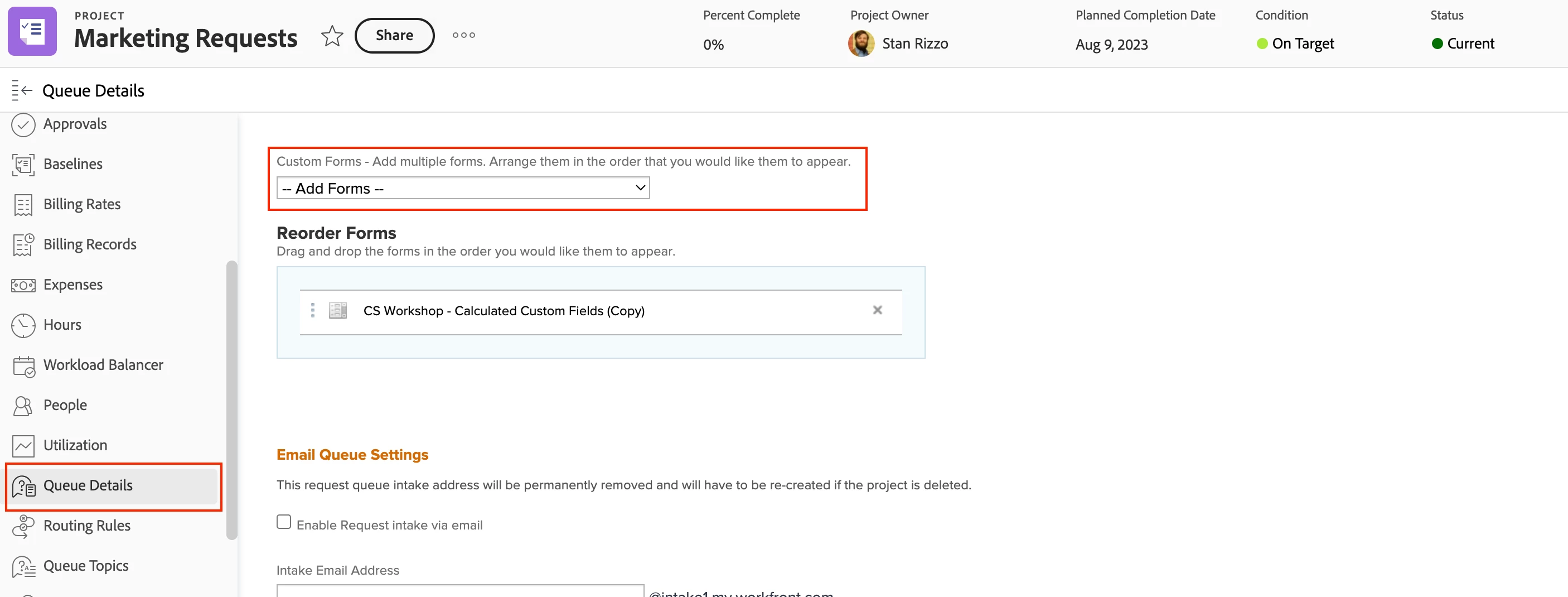
@camostafin-1 If you want a custom form to appear when submitting a new request, you will want to edit the request queue project and go into the Queue Details section and select it from the dropdown menu. 

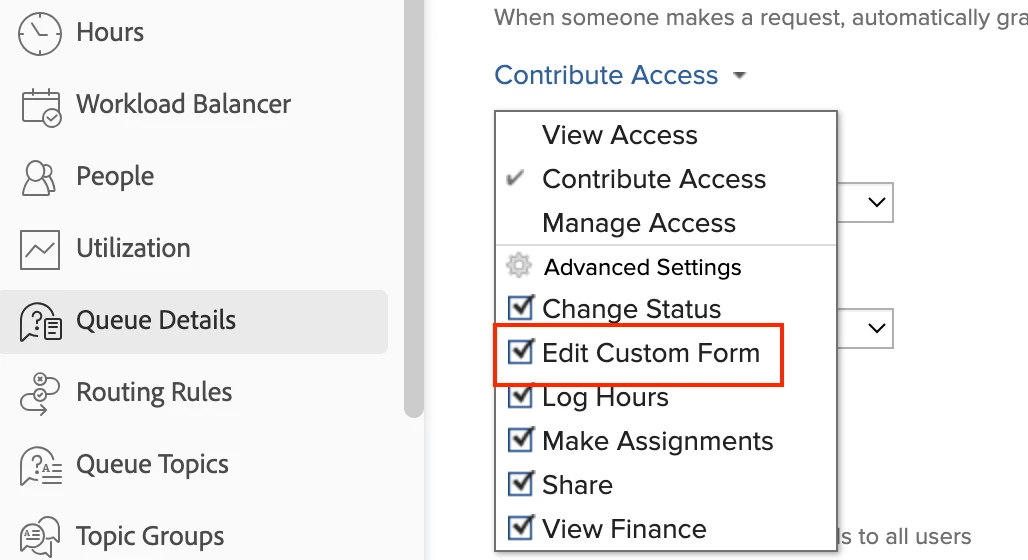
In addition, if you want the custom form to be visible to all or specific users, you will want to make sure that the custom form has been shared with the appropriate people and within your Queue Details tab, make sure that at least Contribute access it selected (or you can choose Manage) with the checkbox for Edit Custom Form also selected, found under the Advanced Options.

Hope that helps to clarify things! 


2 replies

skyehansen
Community Advisor
Community Advisor
August 31, 2023

it's difficult to determine which steps you're missing, to be honest. I would advise you to first start by taking the request queue management course (https://experienceleague.adobe.com/docs/courses/using/workfront-u-1-2022-1-request-queues-1-0.html?lang=en ) which will step you through making sure that your custom form can be seen in a queue.


If you have an existing queue that you need to place this form on, it's not really evident from your question, but you're welcome to elaborate.

NicholeVargas
Adobe Employee
NicholeVargasAdobe EmployeeAccepted solution
Adobe Employee
August 31, 2023

@camostafin-1 If you want a custom form to appear when submitting a new request, you will want to edit the request queue project and go into the Queue Details section and select it from the dropdown menu. 

In addition, if you want the custom form to be visible to all or specific users, you will want to make sure that the custom form has been shared with the appropriate people and within your Queue Details tab, make sure that at least Contribute access it selected (or you can choose Manage) with the checkbox for Edit Custom Form also selected, found under the Advanced Options.

Hope that helps to clarify things! 


September 12, 2023

Hi @nicholevargas 


Very strange, but I was able to get 1 of the 2 forms I want to show up perfectly fine on the dropdown menu. The other form shows up on the dropdown menu as well, but it's not displaying the correct/most up to date version of it. The first screenshot is a very brief original form we created for requests and the second screenshot is a much more recent and detailed version we want to show up. The updated form is active and everything but I don't understand why the wrong version is displaying. Any ideas?


Thanks,

Cameron

NicholeVargas
Adobe Employee
Adobe Employee
September 12, 2023

Cameron, thanks for sharing those screenshots. It looks like you have a section break at the top of your form called "General Project Info." You likely have that setup as an Admin Only section break, meaning that only those with System Admin permissions can view the fields underneath. If you were to adjust the permissions on your section break, then all fields should show up for users to submit requests into.