"Add More Tasks" link disappears | Community
Skip to main content
June 26, 2023
Solved

"Add More Tasks" link disappears

  • June 26, 2023
  • 2 replies
  • 712 views

Hi Workfront Community!

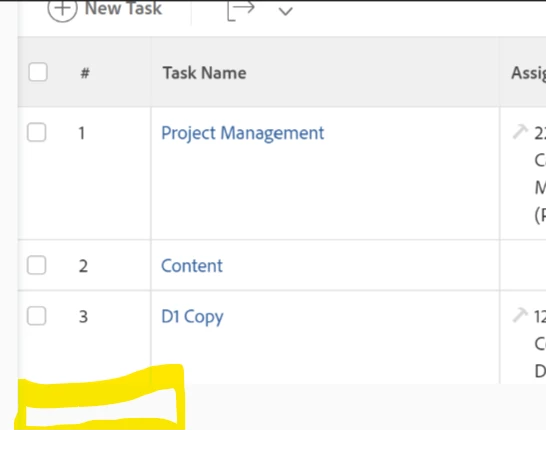
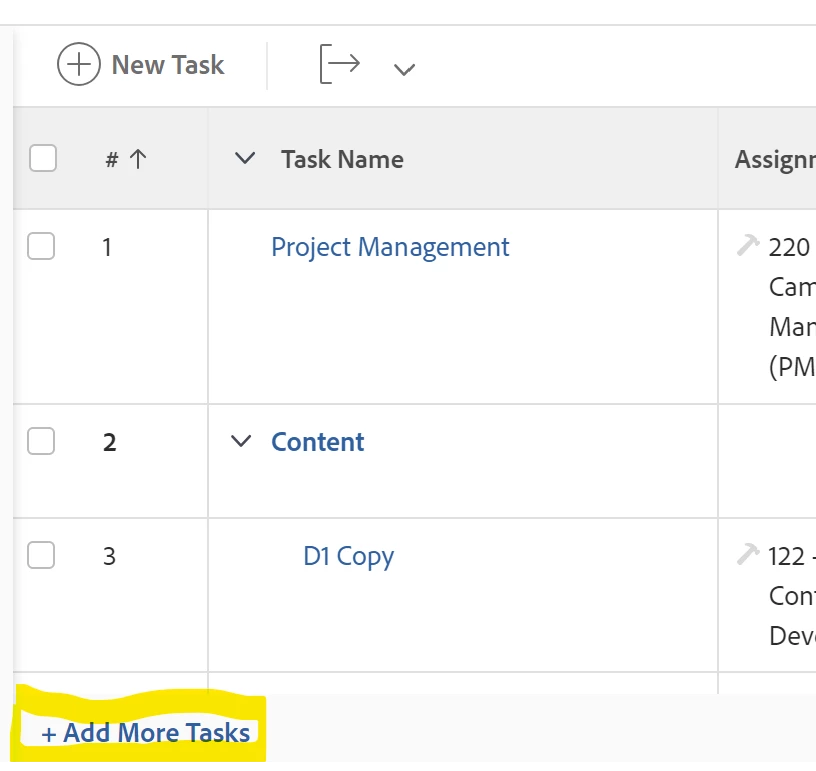
We have a user who is on the correct license, where sometimes the "Add More Tasks" link is no longer visible and the only way to add a new task is by clicking the button at the top. Has anyone else experienced this/have any tips on how to remedy this situation?


We've tried: 

- Clearing the cache

- Adjusting project ownership

- Unsharing/resharing Project, Portfolio, Program, Templates

- Different browsers
 

Thank you!

This post is no longer active and is closed to new replies. Need help? Start a new post to ask your question.
Best answer by skyehansen

this happens to our users all the time, and usually it's because they are no longer sorting by the task number. (Certain functions are only available when the user sorts by task number (As you can see on your screenshot the hashtag doesn't have an "up arrow" next to it); this is one of them.)


--------------------------------

If you liked my post, please like my ideas at
https://experienceleaguecommunities.adobe.com/t5/user/viewprofilepnage/user-id/17528599/contributions/ideas?filter=authored

--------------------------------

2 replies

skyehansen
Community Advisor
skyehansenCommunity AdvisorAccepted solution
June 27, 2023

this happens to our users all the time, and usually it's because they are no longer sorting by the task number. (Certain functions are only available when the user sorts by task number (As you can see on your screenshot the hashtag doesn't have an "up arrow" next to it); this is one of them.)


--------------------------------

If you liked my post, please like my ideas at
https://experienceleaguecommunities.adobe.com/t5/user/viewprofilepnage/user-id/17528599/contributions/ideas?filter=authored

--------------------------------

Kundanism
Level 10
June 27, 2023

Happened many times, just sort the task number column again. This will appear.