Add filter to an item report showing all items that have not been updated in more than two weeks | Community
Skip to main content
May 13, 2025
Solved

Add filter to an item report showing all items that have not been updated in more than two weeks

  • May 13, 2025
  • 1 reply
  • 391 views

Hello, 

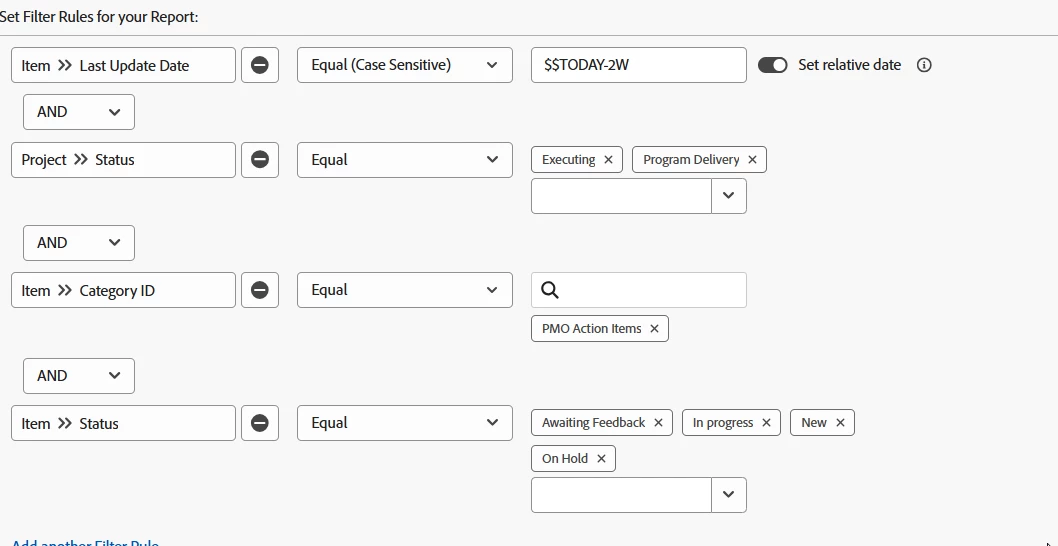
I am creating an item report to show all action items of projects in executing and program delivery status (CUR and ZLH) that have not been updated in more than 2 weeks. 

I have the column "last update date" that shows the last update and there are several rows of data. When i filter the date using the "$$TODAY-2W" wildcard, not data returns in the report. 

What am I doing wrong? or What is the text mode I should be using for this? 
 

I appreciate your time and feedback. 

Amy

This post is no longer active and is closed to new replies. Need help? Start a new post to ask your question.
Best answer by KatherineLa

You're on the right track, but your filter says "equals". That will get you a specific single date, not dates matching that and earlier. You'll want that to be 'equal or lesser than' (or less than) for that part of the filter.


The other one I'd be careful about is filtering on "Category" that way. If your instance has a practice of attaching multiple forms to the same object, that will get unpredictable results. Category as a singular gets you the 'top' custom form listed on the object. If you want to say 'Records where this form is any of the forms attached' you want to use 'Categories ID equals' instead. Then it will search all of them.

1 reply

KatherineLaCommunity AdvisorAccepted solution
Community Advisor
May 13, 2025

You're on the right track, but your filter says "equals". That will get you a specific single date, not dates matching that and earlier. You'll want that to be 'equal or lesser than' (or less than) for that part of the filter.


The other one I'd be careful about is filtering on "Category" that way. If your instance has a practice of attaching multiple forms to the same object, that will get unpredictable results. Category as a singular gets you the 'top' custom form listed on the object. If you want to say 'Records where this form is any of the forms attached' you want to use 'Categories ID equals' instead. Then it will search all of them.