Question
Target Server-side integration for A/B testing fails in no-local environments
Hello everyone, has anyone idea about why Target server-side integration for A/B testing in no-local environment stop working? I'm using the Target nodejs SDK with this on-device config:
export const CONFIG = {
  client: process.env.NEXT_PUBLIC_TARGET_CLIENT_ID,
  organizationId: process.env.NEXT_PUBLIC_TARGET_ORG_ID,
  decisioningMethod: 'on-device',
  pollingInterval: 500000, // 5 minutes
  logger: console,
  timeout: 10000, // 10 seconds
  events: {
    artifactDownloadFailed: (event: any) => {
      console.error('[Target] 🚨 Artifact download failed:', event.error.message);
    },
    artifactDownloadSucceeded: (event: any) => {
      console.log('[Target] ✅ Artifact download succeeded');
    },
  },
};
Creating a Target client:
import TargetClient from '@adobe/target-nodejs-sdk';

const targetClient = TargetClient.create(CONFIG);
And executing the getOffers method:
await client.getOffers({
  request: {
    context: { channel: 'web' },
    execute: { mboxes: [Array] },
    id: { marketingCloudVisitorId: '' },
    experienceCloud: { analytics: [Object] }
  },
  targetCookie: [String],
  sessionId: [String]
})
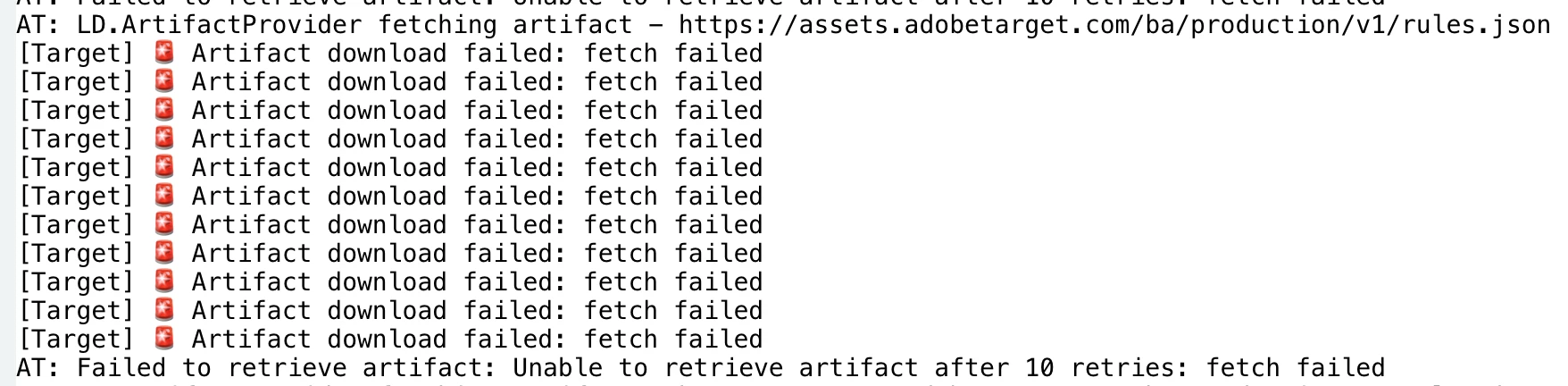
For some reason, in local environment is working as expected, but not in dev environment for example. I'm seeing these logs in the terminal:
Thanks for the support!