Running mutually exclusive AB tests on the same page | Community
Skip to main content
Level 2
August 26, 2021
Solved

Running mutually exclusive AB tests on the same page

  • August 26, 2021
  • 2 replies
  • 2487 views

Hi!


We have 2 A/B tests running on our homepage. They target different audiences but some users fall into both audiences and are therefore currently being counted in both tests which is causing contamination in the data. How can we make these 2 tests mutually exclusive and randomly assign users who fall into both audiences into a test?


I've found here https://experienceleague.adobe.com/docs/target/using/audiences/visitor-profiles/use-profile-scripts-to-test-mutually-exclusive-activities.html?lang=en that we would need to create a profile script as below. What would we then need to do?
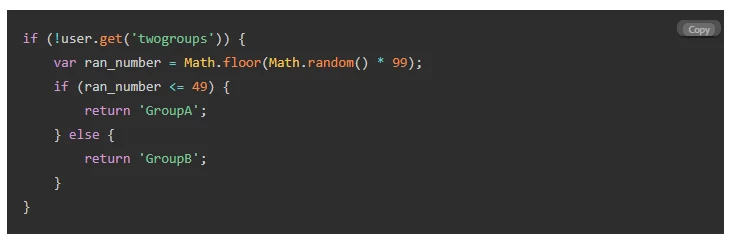
 

Thanks!


This post is no longer active and is closed to new replies. Need help? Start a new post to ask your question.
Best answer by angharadm287005

Update:


I've now set up the profile script and audiences but:

If a customer falls into 'Group A' which I set for Test A, but they actually would've only qualified for Test B, they'll then not qualify for either test? So we would see a reduction in traffic to both tests. Is there any way of avoiding this?

2 replies

angharadm287005AuthorAccepted solution
Level 2
August 26, 2021

Update:


I've now set up the profile script and audiences but:

If a customer falls into 'Group A' which I set for Test A, but they actually would've only qualified for Test B, they'll then not qualify for either test? So we would see a reduction in traffic to both tests. Is there any way of avoiding this?

Level 2
September 9, 2021

Wouldn't you first set up audience who qualified for B? then split the traffic and then exclude that from A and split again.  By default, you are already artificially separating the segments.  So it's not 50%/50% for A and B, it is B, then 50/50, and then exclude B, then 50/50 again. 

Hamilton_Jie
Level 2
September 13, 2021

Given both tests are running on the same page, have you tried excluding test B audience from test A? When editing audience for activities, there's an option called "visitor profile" and one of the drop-down options is "not from other activities"   Haven't personally tested this before, but maybe you can create some kind of a rule combination of "not from other activities" + "page name where you are running the tests"


Another possible solution is to add additional query parameters in the URL where you are running the test so Target can differentiate and avoid audience cross-pollination.

For example:

 Test A: example.com/?control

 Test B: example.com/?experience_B


Hope this helps.