Hi Neil,
Good call-out about our documentation. I will work on getting some JSON Recommendations samples in our help. Let me also provide a quick example in the mean time. JSON responses can be returned when configuring an activity via the form-based editor. Here's how you can test it out:
Setting up a Recommendations Activity that Returns a JSON response
- Create a design from within Design Library or within the form-based workflow. If you attempt to do this inside the visual workflow it will not allow you to create anything other than an HTML design (which is wrapped in a <div> for click tracking purposes.
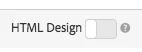
- Make sure the "HTML Design" option is turned off as shown below:
- See an example below of what you could paste into your design
#*
* "Return a simple list of recommended entity ids"
*#
{
"notes":{
"purpose": "Return a simple list of recommended entity ids",
"use-case": "Use this approach if you prefer to do a real-time lookup of entity attribute details (such as inventory, price, rating) from another system (such as a CMS, PIM or ecommerce platform)",
"version": "01"
},
"recommendedItems": {
"key": "$key.id",
"slot-01": "$entity1.id",
"slot-02": "$entity2.id",
"slot-03": "$entity3.id",
"slot-04": "$entity4.id",
"slot-05": "$entity5.id",
"slot-06": "$entity6.id",
"slot-07": "$entity7.id",
"slot-08": "$entity8.id",
"slot-09": "$entity9.id",
"slot-10": "$entity10.id"
}
}
- Now setup a form-based Recommendations activity that uses this design.
- Navigate to the "Activities Page"
- Click "Create Activity"
- Select "Recommendations"
- Under "Choose Experience Composer" select "Form"
- Under location, enter the text: "Sample_Recs_Response"
- Under "Default Content" click the down arrow and "Add Reccomendation"
- Choose a Page Type (this just determines the initial filtering of the next screen)
- Select a Criteria card. Click "Next"
- Select the Design you created in the step above. Click "Save"
- Finish the setup process
- Click the right arrow next to "Inactive." Select "Activate"
- After your activity is setup and activitate, you can setup a sample request to get back the clean JSON response. Note: from the time that you save your activity, Target will need to build a model to support the Criteria configuration selected. Depending on a number of factors, this could take some time. Results will appear once the model has build.
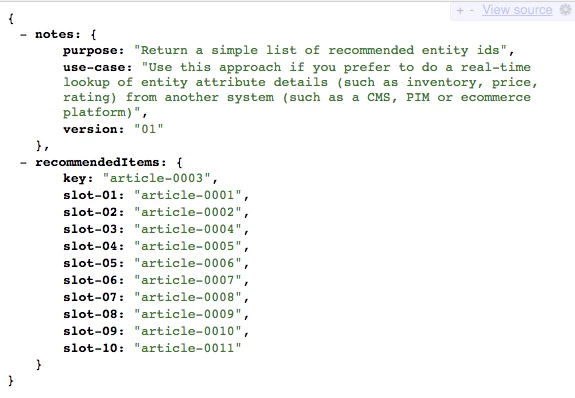
- After your algorithm has run, and you have results, your response should look something like this:
I hope that helps you get started!
Some additional tips and tricks:
You can also just send back a simple comma delimmited list of items by setting up a design with this sytax:
entity1.id, $entity2.id, $entity3.id, $entity4.id, $entity5.id,
Alternatively, there is a lot of additional information that you can send back in the response as well. Below is a much more complex example that returns much more than the entity ids with their associated slots (order). The Design example below also returns Activity details, Target Profile details (as applicable), and other entity.attributes associated with the items returned.
{
"adobeRecommendations": {
"notes": {
"purpose": "Return a list of entity ids with their associated entity.attributes",
"use-case": "Use this approach to avoid looking up attribute details after receiving a response from Target",
"version": "01"
},
"recommendedItems": {
"slot-01": "$entity1.id",
"slot-02": "$entity2.id",
"slot-03": "$entity3.id",
"slot-04": "$entity4.id",
"slot-05": "$entity5.id",
"slot-06": "$entity6.id",
"slot-07": "$entity7.id",
"slot-08": "$entity8.id",
"slot-09": "$entity9.id",
"slot-10": "$entity10.id"
},
"activityDetails": {
"mbox.name": "email-mbox",
"campaign.name": "\${campaign.name}",
"campaign.id": "\${campaign.id}",
"campaign.recipe.name": "\${campaign.recipe.name}",
"campaign.recipe.id": "\${campaign.recipe.id}",
"offer.name": "\${offer.name}",
"offer.id": "\${offer.id}",
"criteria.title": "$criteria.title",
"algorithm.name": "$algorithm.name",
"algorithm.dayCount": "$algorithm.dayCount"
},
"visitorProfile": {
"profile.favorite-category": "\${profile.favorite-category}",
"profile.test": "\${profile.test}",
"user.endpoint.lastPurchasedEntity": "\${user.endpoint.lastPurchasedEntity}",
"user.endpoint.lastViewedEntity": "\${user.endpoint.lastViewedEntity}",
"user.endpoint.mostViewedEntity": "\${user.endpoint.mostViewedEntity}",
"user.endpoint.categoryAffinity": "\${user.endpoint.categoryAffinity}",
"profile.geolocation.city": "\${profile.geolocation.city}",
"profile.geolocation.dma": "\${profile.geolocation.dma}",
"profile.geolocation.state": "\${profile.geolocation.state}",
"profile.geolocation.country": "\${profile.geolocation.country}",
"profile.sessionCount": "\${profile.sessionCount}",
"profile.averageDaysBetweenVisits": "\${profile.averageDaysBetweenVisits}",
"profile.browserTime": "\${profile.browserTime}",
"user.activeActivities": "\${user.activeActivities}",
"user.pcId": "\${user.pcId}",
"user.isFirstSession": "\${user.isFirstSession}",
"user.isNewSession": "\${user.isNewSession}",
"user.header": "\${user.header}",
"user.parameter": "\${user.parameter}"
},
"recKey": {
"recKeyDetails": {
"id": "$key.id",
"name": "$key.name",
"category": "$key.category",
"pageUrl": "$key.pageUrl",
"thumbnailUrl": "$key.thumbnailUrl"
}
},
"recDetailedResults": {
"recEntity1Details": {
"id": "$entity1.id",
"name": "$entity1.name",
"category": "$entity1.category",
"pageUrl": "$entity1.pageUrl",
"thumbnailUrl": "$entity1.thumbnailUrl"
},
"recEntity2Details": {
"id": "$entity2.id",
"name": "$entity2.name",
"category": "$entity2.category",
"pageUrl": "$entity2.pageUrl",
"thumbnailUrl": "$entity2.thumbnailUrl"
},
"recEntity3Details": {
"id": "$entity3.id",
"name": "$entity3.name",
"category": "$entity3.category",
"pageUrl": "$entity3.pageUrl",
"thumbnailUrl": "$entity3.thumbnailUrl"
},
"recEntity4Details": {
"id": "$entity4.id",
"name": "$entity4.name",
"category": "$entity4.category",
"pageUrl": "$entity4.pageUrl",
"thumbnailUrl": "$entity4.thumbnailUrl"
},
"recEntity5Details": {
"id": "$entity5.id",
"name": "$entity5.name",
"category": "$entity5.category",
"pageUrl": "$entity5.pageUrl",
"thumbnailUrl": "$entity5.thumbnailUrl"
},
"recEntity6Details": {
"id": "$entity6.id",
"name": "$entity6.name",
"category": "$entity6.category",
"pageUrl": "$entity6.pageUrl",
"thumbnailUrl": "$entity6.thumbnailUrl"
},
"recEntity7Details": {
"id": "$entity7.id",
"name": "$entity7.name",
"category": "$entity7.category",
"pageUrl": "$entity7.pageUrl",
"thumbnailUrl": "$entity7.thumbnailUrl"
},
"recEntity8Details": {
"id": "$entity8.id",
"name": "$entity8.name",
"category": "$entity8.category",
"pageUrl": "$entity8.pageUrl",
"thumbnailUrl": "$entity8.thumbnailUrl"
},
"recEntity9Details": {
"id": "$entity9.id",
"name": "$entity9.name",
"category": "$entity9.category",
"pageUrl": "$entity9.pageUrl",
"thumbnailUrl": "$entity9.thumbnailUrl"
},
"recEntity10Details": {
"id": "$entity10.id",
"name": "$entity10.name",
"category": "$entity10.category",
"pageUrl": "$entity10.pageUrl",
"thumbnailUrl": "$entity10.thumbnailUrl"
}
}
}
}
Thanks!
Jon Tehero