Recommendations Criteria Not Showing Up When Building Activity | Adobe Higher Education
Skip to main content
Level 2
August 23, 2022
해결됨

Recommendations Criteria Not Showing Up When Building Activity

  • August 23, 2022
  • 1 답변
  • 2519 조회

Hi! I am trying to create a recommendations activity to show recommended articles on a blog based on the article a visitor is currently on. My criteria is to look at the current category ID and show other articles w/ same category. I believe the best way to set this up would be an items with similar attributes algo, with current item as recommendation key and the content similarity using entity.category. When I create the activity, I am unable to find/select that criteria I created. In fact, out of the 59 criterias I have, I can only see 26 within the activity even though I've made sure the activity and criteria both use the article and category page types. Please assist, thanks!
이 주제는 답변이 닫혔습니다.
최고의 답변: Gaureshk_Kodag

Hi @bwilson704

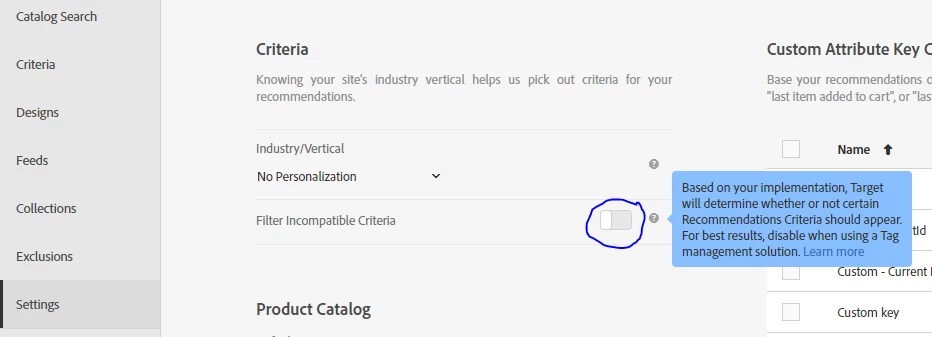
to resolve this go to recommendations settings and turn on filter incompatible criteria. You will be able to see the criteria.


Hope this helps.

1 답변

Gaureshk_Kodag
Adobe Employee
Adobe Employee
August 24, 2022

Hi @bwilson704 

While selecting criteria in activity, the page type filter gets applied automatically, uncheck all checkboxes and then you'll be able to see the criteria.


bwilson704작성자
Level 2
August 24, 2022

Really appreciate the response! The issue is that I don't have any filters selected and the max I can see is 26, even though my total criteria inventory is 59.


January 31, 2023

Hi @gaureshk_kodag ,


I have same issue as @bwilson704 I don't have any filters selected and the max I can see is 28, even though my total criteria inventory is 58. Also, I am not able to see "Filter Incompatible Criteria option" in recommendation settings. Please assist, Thanks!


Hi @sd20 ,

Am facing the same issue as you stated above i.e.,not able to see "Filter Incompatible Criteria option" in recommendation settings.
Did you find any solution for this issue?

Best,