Pass multiple values in a single profile script | Adobe Higher Education
Skip to main content
patrickb8312284
Level 2
July 27, 2020
解決済み

Pass multiple values in a single profile script

  • July 27, 2020
  • 1 の返信
  • 1308 ビュー

Is it possible to pass multiple values in a profile script?


I have 8 products for each user saved to their customer attributes. I am setting up Recommendations and need to setup the Criteria so that it shows these products in the design.


Using the script below as example, which returns one of the products, can I set it so that it returns all 8 in one script?


if (crs.get('offline customer.userid')) {

return crs.get('offline customer.prod1');

}
このトピックへの返信は締め切られました。
ベストアンサー ryanr7

Hi @patrickb8312284,

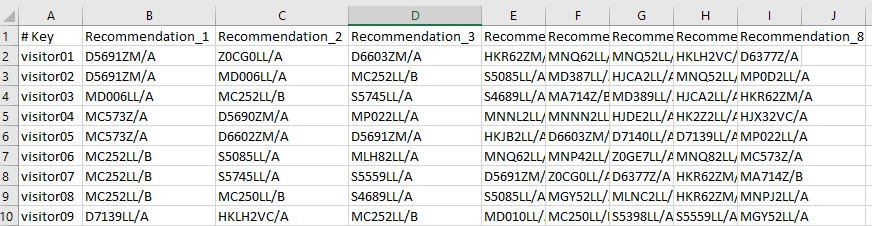
A profile script generally will return a single value. Though it could be some sort of concatenated string. I think your use case might be better achieved in a different way. If you are wanting Recommendations to generate the results you could try a custom criteria with a custom key. Your custom criteria file could use the visitor's id as the key and then you can list the 8 product id's you want that visitor to see (probably very similar your customer attributes files with new column names). Something like this:

Then you setup a custom key in Recommendations that uses the same visitor id used in your custom criteria. Be sure to set the recommendation key in your custom criteria as the new custom key. Then create an activity that uses your custom criteria and your preferred design.

Hope that helps!

-Ryan

1 の返信

ryanr7Adobe Employee回答
Adobe Employee
July 29, 2020

Hi @patrickb8312284,

A profile script generally will return a single value. Though it could be some sort of concatenated string. I think your use case might be better achieved in a different way. If you are wanting Recommendations to generate the results you could try a custom criteria with a custom key. Your custom criteria file could use the visitor's id as the key and then you can list the 8 product id's you want that visitor to see (probably very similar your customer attributes files with new column names). Something like this:

Then you setup a custom key in Recommendations that uses the same visitor id used in your custom criteria. Be sure to set the recommendation key in your custom criteria as the new custom key. Then create an activity that uses your custom criteria and your preferred design.

Hope that helps!

-Ryan