Hi @girirajvi
It really depends on what exactly you are trying to achieve.
As @pradnya_balvir explains you can pass an mbox parameter (e.g. profile.userStatus=logged in), this will allow you to create an audience in Target that will contain all users who have logged previously logged in.
This will require you implement the before mentioned parameter.
You're most likely already tracking logins in Adobe Analytics and if so, you don't have to implement the mbox parameter. You can simply create the segment in Adobe Analytics (e.g. Visitor where login exist) and then share it to Experience Cloud:
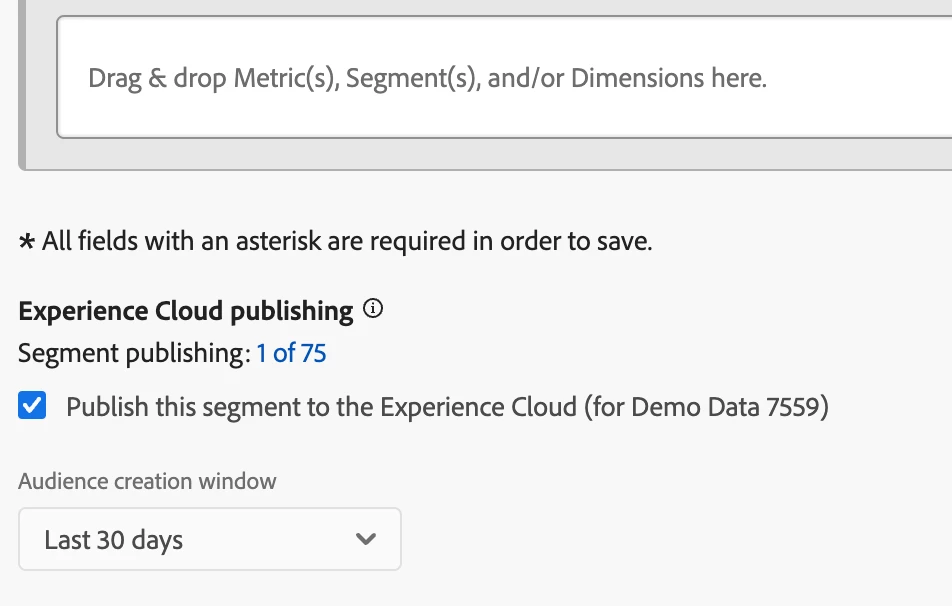
This segment will then be available in Target and give you the same abilities as the mbox parameter.
Customer Attributes will give you the ability of uploading meta data to the user - eg. member status, call center data, etc. This will allow you to create audiences in Target on data that typically isn't available for you.
In order for this to work you need to be passing the a unique identifier for each user when they login (e.g. hashed version of a member id) and it MUST be in Targets mbox3rdPartyId parameter, as it otherwise won't work: https://experienceleague.adobe.com/en/docs/target/using/audiences/visitor-profiles/working-with-customer-attributes#using-mbox3rdpartyid-in-your-website-for-a-successful-implementation-and-usage
I hope this clarifies.