Level 2
Aug 31, 2020 3:32 AM UTC
Solved

Generating Dynamic Headlines based off of information collected from Paid advertisements?

I'd like to personalize my website where the hero heading of my homepage will dynamically change if the visitor clicks on one of my paid advertisements on Google.


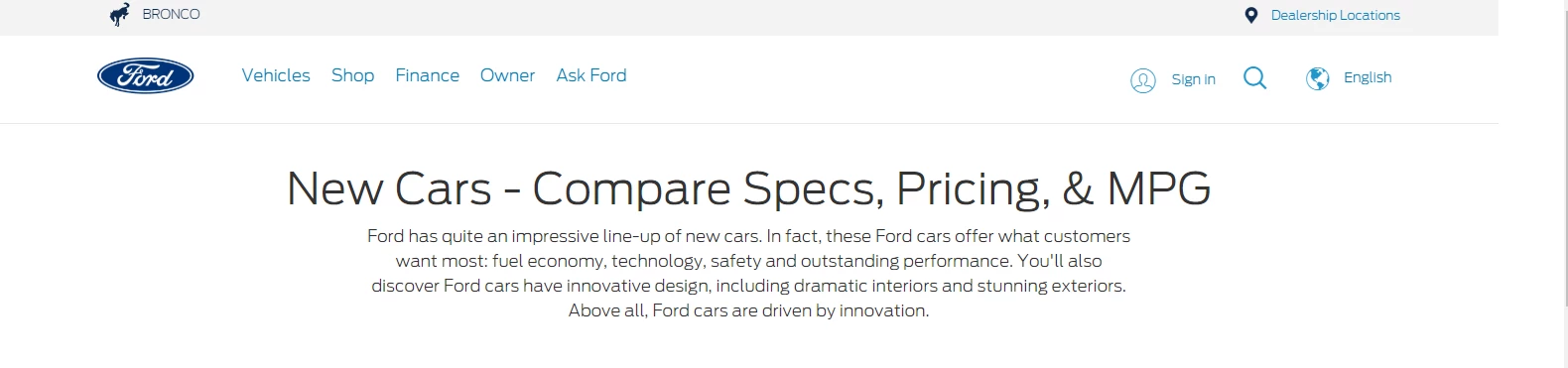
For example, suppose my paid ad contains :"New Cars - Compare Specs, Pricing & MPG", similar to this paid advertisement by ford.

 

If the visitor clicks on my paid advertisement, I'd like to build a personalized experience where the title of the paid ad is used as the heading of my hero banner on my homepage.
 

Would this be feasible? If so, how would I go about developing this experience?

 

This post is no longer active and is closed to new replies. Need help? Start a new post to ask your question.
Gaureshk_Kodag
Gaureshk_KodagAccepted solution
Adobe Employee
Aug 31, 2020 7:51 PM UTC

Hi @Alandy_Iceboats


This is possible using Javascript. 

Basically what you need to do is, just attach an click event on advertisement section.. on click of advertisement retrieve advertisement heading and store it in a variable.

For ex. document.getElementById("demo").onclick = function { advertisement_heading = document.getElementById("adblock").innertext;}

Now use that heading (stored in variable advertisement_heading) in your hero banner

You can write code snippet accordingly and add it in add custom code option under the modification tab.


Hope this works

If you need any clarification please feel free to ask.

Thanks,

Gauresh.

6 replies

Gaureshk_Kodag
Adobe Employee
Adobe Employee
Aug 31, 2020 7:35 PM UTC

Hi @iceboats


This is possible using Javascript. 

Basically what you need to do is, just attach an click event on advertisement section.. on click of advertisement retrieve advertisement heading and store it in a variable.

For ex. document.getElementById("demo").onclick = function { advertisement_heading = document.getElementById("adblock").innertext;}

Now use that heading (stored in variable advertisement_heading) in your hero banner

You can write code snippet accordingly and add it in add custom code option under modification tab.

Hope this works

If you need any clarification please feel free to ask.

Thanks,

Gauresh.

Translate
Gaureshk_Kodag
Adobe Employee
Gaureshk_KodagAdobe EmployeeAccepted solution
Adobe Employee
Aug 31, 2020 7:51 PM UTC

Hi @Alandy_Iceboats


This is possible using Javascript. 

Basically what you need to do is, just attach an click event on advertisement section.. on click of advertisement retrieve advertisement heading and store it in a variable.

For ex. document.getElementById("demo").onclick = function { advertisement_heading = document.getElementById("adblock").innertext;}

Now use that heading (stored in variable advertisement_heading) in your hero banner

You can write code snippet accordingly and add it in add custom code option under the modification tab.


Hope this works

If you need any clarification please feel free to ask.

Thanks,

Gauresh.

Translate
Level 2
Sep 1, 2020 2:06 PM UTC
Hi Gauresh, thanks for the reply. How can I attach that click event on the paid ad section of Google? I'm not sure if Google allows users to add custom code to their search engine.
Translate