Adobe Target V2: Conditional Delivery Call Based on DOM Element | Community
Skip to main content
Level 2
November 11, 2025
Question

Adobe Target V2: Conditional Delivery Call Based on DOM Element

  • November 11, 2025
  • 2 replies
  • 164 views

How do I enable the delivery call only when a particular section is available in the DOM?
I am using the Adobe Target V2 extension. If you need any details from me, please feel free to ask.
2 replies

Gokul_Agiwal
Community Advisor
Community Advisor
November 11, 2025

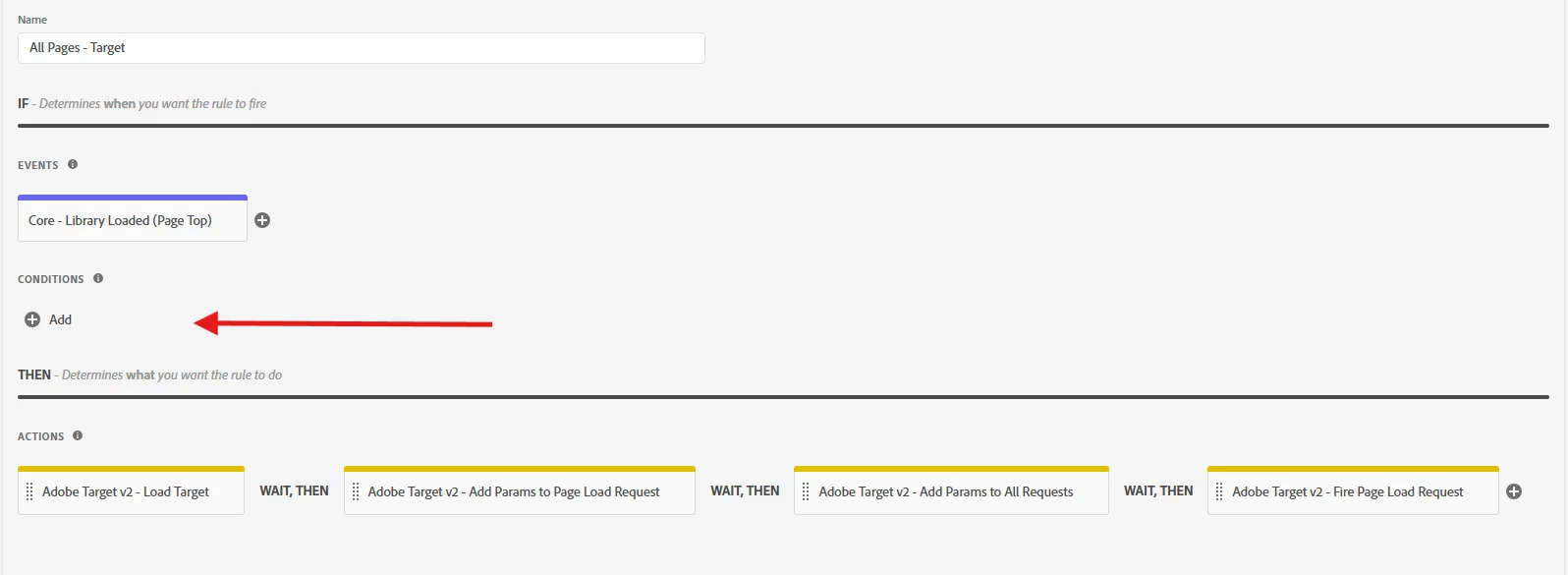
Hi @prasanthv  Generally the delivery calls happening at the time of page loads. In case you want this to restrict based on DOM elements then you can create a Rule in Adobe Launch ( tag manager)  that checks for the presence of a DOM element before firing the Target delivery call. 


Like in below Rule - You can check for condition. By the way what's your use case? If you share more details ... 


Hope this helps. 

PrasanthVAuthor
Level 2
November 13, 2025

Hi @gokul_agiwal ,

This is my condition script, but it's not working.

var elementCheck = setInterval(function () {
  if (document.querySelectorAll('.listing-icons__header-wrapper__title.listing-icons-title.line-clamp-2').length > 1) {
    clearInterval(elementCheck);
  }
}, 100);
return false;
Gokul_Agiwal
Community Advisor
Community Advisor
November 14, 2025

Hi @prasanthv  

I did try with custom code just added document.querySelector('') with right DOM element from page and it's working for me. So when the DOM element is available then only I can see the Target is getting fired. 


So may I ask why you're using setInterval method here? the element you've added not present in the page initially is it the case?  Incase if element getting load later in the page then try once with setTimeout function. 


let me know how it goes. Thanks

Perrin_Ennen
Community Advisor
Community Advisor
January 28, 2026

Hi ​@PrasanthV,
Has the problem been solved yet, or do you still need support?