
Email Tracking URL Security Enhancement | Community
Skip to main content
Mike_Reynolds2
Level 10
June 6, 2017

Email Tracking URL Security Enhancement

  • June 6, 2017
  • 23 replies
  • 3365 views

Overview

For added security, we have added functionality to validate that email tracking URL hash codes originate from the same domain in the subscription. A unique email tracking URL hash code is what is used to identify which Marketo instance the link is coming from, enabling the tracking functionality in your emails.

Example

Here’s an example of how an email tracking URL is constructed:
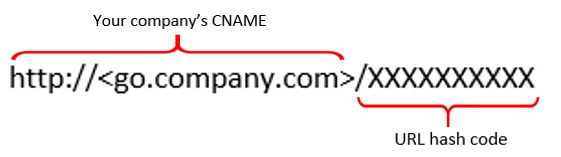
Enhancement being made:

This enhancement will add extra validation to the tracking URLs used in your emails.

When our tracking server receives the link, it will use the URL hash code to identify the Marketo instance. It then looks up the branding domains associated with the subscription.

If the domain presented in the URL matches a branding domain we have listed for you, the link will connect just as it should. If the domain in the URL does not match a domain in our database, it will be considered suspicious and will be stopped and a "404 error" will be displayed.
This post is no longer active and is closed to new replies. Need help? Start a new post to ask your question.

23 replies

Mike_Reynolds2
Level 10
June 7, 2017

@Robb,​

No problem, let's just break it down to sort it out. First thing is, you have to pretend you're a hacker with malicious intent. Because if you're affected by this at all, you'd first have to be doing something fishy for a clearly malicious intent.

The branding domain takes you to the Marketo servers, and then the hash code represents the destination URL you want to go to, which should be the one for your own site.

Let's say you work for MaliciousCompanyA and you're creating a scam. In Marketo, you set up a branding domain of go.maliciouscompanya.com so your hyperlinks are go.maliciouscompanya.com/XXXXXX.

Now we have TotallyInnocentCompanyB with the branding domain of go.totallyinnocentcompanyb.com, and their hyperlinks are go.totallyinnocentcompanyb.com/ZZZZZZZZ.

So you're creating a scam page you want to take people to: maliciouscompanya.com/XXXXXtotalscampage and you want to create a hyperlink that looks like it's coming from TotallyInnocentCompanyB, when in fact it's coming from your scam site. Take the branding domain from the one company, go.totallyinnocentcompanyb.com and then change out the hash code with the one for your scam site.

go.maliciouscompanya.com/XXXXXtotalscampage

becomes

go.totallyinnocentcompanyb.com/XXXXtotalscampage.

The security enhancement in place prevents that from happening by adding an additional layer of validation between the branding domain and the hash code. So if you're the TotallyInnocentCompanyB, your branding domain of go.totallyinnocentcompanyb.com can't be used to go to any hash code other than the ZZZZZZ hash for your own company.

The reason this doesn't affect third party websites is because you're not linking them to your branding domain. If you're adding a link into your email saying "Hey, let's go to google.com and look at this", it goes to google.com, not your branding domain go.totallyinnocentcompanyb.com/ZZZZZgoogle.com.

So the short version is, this beefs up security to protect you and has no functional difference for you. ...unless you're a hacker. Because if you're a hacker, this will really mess up your day

June 7, 2017

Unless I am mistaken (somebody, please correct me!), the vulnerability just allowed any existing hashes to be used on the end of any branding domain. Exploiting it did rely on the malicious actor being able to generate a valid Marketo email tracking link pointing to the desired destination. So you questions about crafting from the outside are valid... you're right, I don't know of a way to craft hashes from the outside (unless you've made your own vulnerability in a Velocity script which builds tracked links from a user-provided Marketo field value).

SanfordWhiteman
Level 10
June 7, 2017

OK, so redirector hashes didn't actually have an owning instance before. That's a lot simpler of an explanation!

Of course there are plenty of other ways for a malicious Marketo user to disrupt other Marketo users, but it's good to have this one out of the way.

June 7, 2017

Yep, that's my understanding... and I'm stealing your phrasing, as long as nobody corrects the both of us. That is a good way to describe it.

Level 4
June 8, 2017

I think this makes sense to me. In Robb's example, can he check to see if his branding domain includes GE.com? If not, can he add it? Would he need to?

SanfordWhiteman
Level 10
June 8, 2017

Turns out this has nothing to do with the URLs added to the email by email authors.

It just means Marketo users can't use other users' branding domains (which shouldn't have been possible in the first place).

Robb_Barrett
Level 10
June 8, 2017

Got it.  The branding domain actually did nothing in the past then, if that's my understanding. It's all on the string after the domain.  With as many Marketo users as there are sending out as many emails as they do, how often was it that a duplicate string could have occurred?

Is the solution meant to thwart malicious users or just the chance of duplicates?

Robb Barrett
Mike_Reynolds2
Level 10
June 8, 2017

The branding domain does have a big part to play. It's a combination of identifying the instance in Marketo and authorizing the Marketo servers to send emails on your behalf. If you're a recipient mail server and you receive an email saying that it's from one company (your company) but the address that sent it is actually from someone else (Marketo), then it looks suspicious. The branding domain is a way to authorize the other entity to send emails on your behalf. The issue with the hash code isn't to avoid duplicates - with that long of a code string, it's extremely difficult to end up with duplicates. It's an extra layer of security validation.

Robb_Barrett
Level 10
June 8, 2017

Well, hold on a moment. What you're saying about the branding domain is giving me a confuse. Aren't you talking about the SPF / DKIM SDID? That's the one that lets other email servers know that Marketo is authorized to act as an agent for a company, right?

The branding domain is used to re-code links in the body of the email to point them to a Marketo tracking service, so it would overwrite www.thisdomain.com with click1.companywebsite.com/1234ABCD and then redirect to www.thisdomain.com. What you stated in a previous email is that in the past, Marketo only looked at 1234ABCD and not exactly the branding domain in front of it. If that's the case, then every couple of billion links sent in all the emails Marketo sends someone would get sent to the wrong page, potentially.

If email servers looked at branding domains then any time my wife sent me an amazon.com link for a dog bed she thinks our dogs need, it would block the email and I'd be a happy man.

Mike....do me a favor buddy....I'm on Lisinopril for high blood pressure and I almost had to see my Doctor yesterday for a stronger dose after this announcement. Next time you guys make an announcement like this, run it past the least techy person you know and see if they understand it. If they nod their head, start drooling and can only say "uh-huh" then they don't really get it.

Robb Barrett
SanfordWhiteman
Level 10
June 8, 2017

I agree, Robb, this has nothing to with "authorization" as is currently understood.

The branding domain merely rewrites the URLs and requires no proof at all that the envelope sender domain and/or From/Reply-To: domain is "authorized" to use the branding domain.

In fact before multiple branding domains were introduced (was that this year or late last year?) you had to have mismatched envelope, header, and branding domains when you sent mail on behalf of multiple domains.