
Email Tracking URL Security Enhancement | Community
Skip to main content
Mike_Reynolds2
Level 10
June 6, 2017

Email Tracking URL Security Enhancement

  • June 6, 2017
  • 23 replies
  • 3365 views

Overview

For added security, we have added functionality to validate that email tracking URL hash codes originate from the same domain in the subscription. A unique email tracking URL hash code is what is used to identify which Marketo instance the link is coming from, enabling the tracking functionality in your emails.

Example

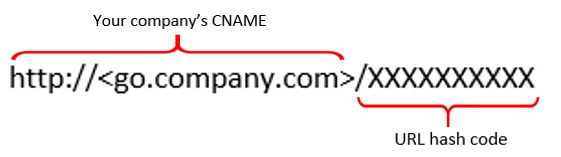
Here’s an example of how an email tracking URL is constructed:
Enhancement being made:

This enhancement will add extra validation to the tracking URLs used in your emails.

When our tracking server receives the link, it will use the URL hash code to identify the Marketo instance. It then looks up the branding domains associated with the subscription.

If the domain presented in the URL matches a branding domain we have listed for you, the link will connect just as it should. If the domain in the URL does not match a domain in our database, it will be considered suspicious and will be stopped and a "404 error" will be displayed.
This post is no longer active and is closed to new replies. Need help? Start a new post to ask your question.

23 replies

SanfordWhiteman
Level 10
June 7, 2017

If the domain presented in the URL matches an email domain we have listed for you...

Mike, by "an email domain" you mean a domain in Admin » Email » SPF/DKIM?

If so, why should/would a the domain of an email link have a relationship with those domains? Is it no longer possible to link to a third-party site without that site being registered in the Admin UI? And what level of validation is required for a domains to be considered "in our database"?

Is this related to my comment here and the subsequent fix w/r/t Marketo Nation?

This change requires much, much more explanation IMO.

@Dan Stevens​

June 7, 2017

I've got to agree with Sanford here. This sounds like it's going to flag any third party site. Is that the case? If so, that's a huge problem. If that's not the case, you should really clarify.

Dan_Stevens_
Level 10
June 7, 2017

Since it's just the tracking URL (and not the URL behind it), I suspect this would still allow us to link to third-party sites, correct?

I also came across this - not sure if it's related:

Vulnerability Report: Open Redirect in Jive Social Networking Platform :: From Eric H. Goldman

SanfordWhiteman
Level 10
June 7, 2017

Since it's just the tracking URL (and not the URL behind it), I suspect this would still allow us to link to third-party sites, correct?

Yes, if that's what it means, it's fine.. but it's not at all clear.

Not sure what the vulnerability would be if it's about the tracking domain, since each (original target) URL gets a unique hash so shouldn't be able to be crafted from outside. Even if I can register any old domain and create a CNAME pointing to somebody's Marketo instance I shouldn't be able to make valid redirector links on my own.

SanfordWhiteman
Level 10
June 7, 2017

Still not clear.

Is this only to stop people from creating CNAME records pointing to other people's Marketo instances and (re)using hashes from existing emails (which obvs. should never have been allowed to work). Or is it about the final target URL of email links, after redirection?

Mike_Reynolds2
Level 10
June 7, 2017

@Sanford Whiteman​ @Dan Stevens​ @Osman Erzinclioglu​

The security enhancement here wouldn't stop you from using a third party link in your email. I've updated the verbiage to clarify what it's referring to, which is the branding domain. So you could add a link in your email to link customers to a 3rd party site and you can also still allow tracking on that link as well. What you can't do though (thanks to this security upgrade) is put the branding domain for that 3rd party company in front of a hash that directs you to your own site instead.

There is no functional behavior change.

There are a few different questions here so let me run down the list.

By "an email domain" you mean a domain in Admin » Email » SPF/DKIM?

Close, but no. This is referring to the branding domain located in Admin > Email on the Email tab. The doc has been updated to reflect that. Here’s a screen shot of what it’s referring to:

Why should/would the domain of an email link have a relationship with those domains?

The hash code allows us to resolve to the originating subscription of the tracking link and therefore we can lookup the list of branding domains associated to the subscription.  In the example above, if your list of email branding domains contain “go.company.com”, then it matches with the domain in the tracking URL http://<go.company.com>/XXXXXXXXXXXXXXX

Is it no longer possible to link to a third-party site without that site being registered in the Admin UI?

No, it's still possible because the tracking URL is not the final destination. For example, http://<go.company.com>/XXXXXXXXXXXXXXX can redirect you to https://www.marketo.com

Is this related to my comment here and the subsequent fix w/r/t Marketo Nation?

No

I hope that helps. Let me know if there are any other questions at all.

Robb_Barrett
Level 10
June 7, 2017

OK, this is a big deal for me.  In my instance, gehealthcare.info is set up in the SPF / DKIM records but a lot of time we use @ge.com when we want the mail to come from known addresses.  Does this mean that my @ge.com emails are no longer going to work?  Sometimes the email is @med.ge.com. 

This is a sudden change and I don't recall notice of this happening. If this is blocking my emails from going out, I need to know ASAP along with how to fix this.  Thank you.

Robb Barrett
Mike_Reynolds2
Level 10
June 7, 2017

@Robb Barrett PRD​

There's no functional behavior change that you'd see from this change. It's a security upgrade being done on the back end that affects the hyperlinks used inside the email, not the email's from address.

Robb_Barrett
Level 10
June 7, 2017

@Mike Reynolds​, please understand that this is a bit over my head but has me very concerned. Can you please very clearly and simply explain what is happening and how this benefits me?  I've read this several times and I'm very confused and worried about this change. I don't understand this line:

"What you can't do though (thanks to this security upgrade) is put the branding domain for that 3rd party company in front of a hash that directs you to your own site instead."

I'm not sure how or why this would be done or what it even means.

Robb Barrett
June 7, 2017

If I am understanding correctly, the vulnerability was that each hash could use any branding domain in the request. For a tracking hash of XYZ123 generated by Malicious Customer, requests to click.maliciousCustomer.com/XYZ123 (the generated tracking link) and click.anyOtherCustomer.com/XYZ123 (with the hostname replaced by another company's Marketo branding domain) were handled the same way, resulting in redirection. While this allows some level of impersonation, I cannot find any route for data leakage... but I'd love to hear your thoughts .

The fix just returns a 404 page (oddly with a 200 status) when the email branding domain used in the current request cannot be found among the email branding domains configured for the hash's originating Marketo instance.