Level 2
Jan 27, 2021 7:29 PM UTC
Question

Smart List Filters

Hi there, I'm new to Marketo and could use help understanding this topic a bit more. I'm currently creating a smart list and wanted to use a filter that would exclude commercial opportunities. In the pictures attached it shows what filter options I have. After trying all the  options I realized that none offer an exclusion for commercial within the drop down menus.
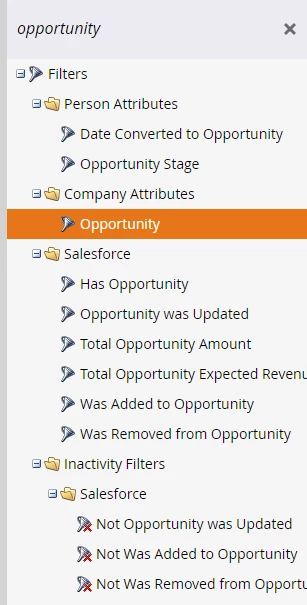

 

If someone could provide more insight to what options I might have that would be greatly appreciated!

This post is no longer active and is closed to new replies. Need help? Start a new post to ask your question.

2 replies

Michael_Florin-2
Level 10
Jan 28, 2021 10:35 AM UTC

I guess in order to help you here, we'd need to know what "exclude commercial opportunities" means in your Salesforce language. What exactly are the features of an opportunity to be considered "commercial"?


And the next question I suppose would be: Do you find that feature in the constraints of your "Has Opportunity" filter?


Translate
Katja_Keesom
Adobe Champion and Community Advisor
Jan 28, 2021 12:56 PM UTC

That's indeed where I would start looking. I noticed you were focused on a company field called Opportunity, but that is in fact not your entire opportunity object, but just a singular field.

As Michael pointed out you are looking for "Has Opportunity" instead, which will give you all the fields in the Opportunity object under Constraints to add as filters.

Translate