Level 1
Nov 16, 2023 6:02 PM UTC
Solved

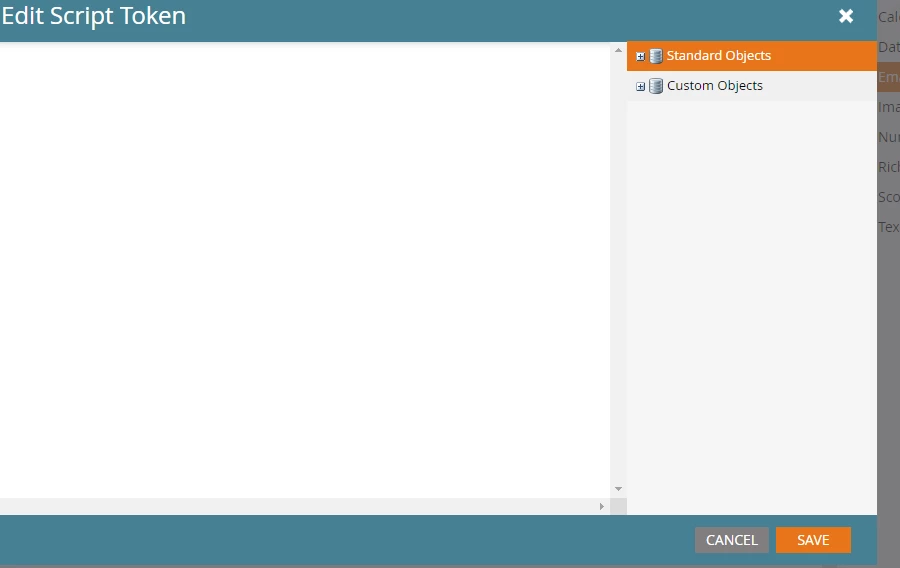
Edit Scripting Screen Menu won't expand


Recently when attempting to add a script token, the right hand menu of standard and custom objects won't expand. How do we fix this? See screenshot.


This post is no longer active and is closed to new replies. Need help? Start a new post to ask your question.
Katja_Keesom
Katja_KeesomAccepted solution
Adobe Champion and Community Advisor
Nov 19, 2023 5:22 PM UTC

Unfortunately not uncommon and a frustration indeed. Just raised this with the product team to see if the bug can be fixed. In the mean time, any of the solutions the guys suggested will generally do the trick.

5 replies

Darshil_Shah1
Adobe Champion, Community Advisor, UG Leader
Nov 17, 2023 3:17 AM UTC

I've seen this (unfortunately, more times than desired), but opening the Marketo instance in an incognito window or a different browser has usually worked for me. I've also come across a situation where I wasn't able to save the velocity script because I had limited rights per the error dialog box, but I was the admin of the instance. That also got fixed on its own after some time. If neither of the things works out for you, I'd suggest you open a support ticket and include the snapshot and a loom video so they exactly know what the issue is.

Translate
Michael_Florin-2
Level 10
Nov 17, 2023 7:48 AM UTC

Happens to me in ~30% of all cases. Just try again.


And I believe the more fields you have, the more likely it is that the lists won't load. Unfortunately, hidden fields are loaded too.

Translate
Darshil_Shah1
Adobe Champion, Community Advisor, UG Leader
Nov 19, 2023 10:01 AM UTC

Exactly- more fields and synced custom objects (basically a heavy tree) make an instance more vulnerable to this. I hope they fix this soon! A couple of times it got fixed for me on its own before the support got back to me the next day, so creating a loom video certainly helps.

Translate
Level 4
Nov 17, 2023 2:45 PM UTC

Page reload or (sometimes) re-logon helps in my case in 99% of the cases 🙂

Translate
Katja_Keesom
Adobe Champion and Community Advisor
Katja_KeesomAdobe Champion and Community AdvisorAccepted solution
Adobe Champion and Community Advisor
Nov 19, 2023 5:22 PM UTC

Unfortunately not uncommon and a frustration indeed. Just raised this with the product team to see if the bug can be fixed. In the mean time, any of the solutions the guys suggested will generally do the trick.

Translate