Using inactivity filters | Community
Skip to main content
April 1, 2015
Solved

Using inactivity filters

  • April 1, 2015
  • 4 replies
  • 2042 views
Hi,

I am setting up an Email Blast that I would like to send to leads who A) were not delivered a certain email and B) are not members of an engagement program. I am trying to figure out how to best apply filters to my smart list in order to achieve this.

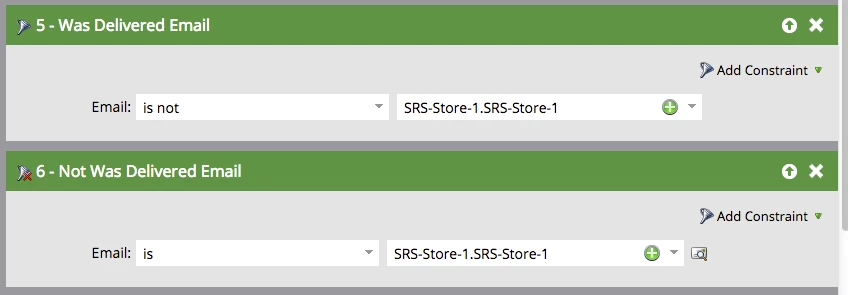
Is there an advantage to using the "Was Delivered Email" filter or the "Not Was Delivered Email" filter, and are they set up correctly to meet my criteria?

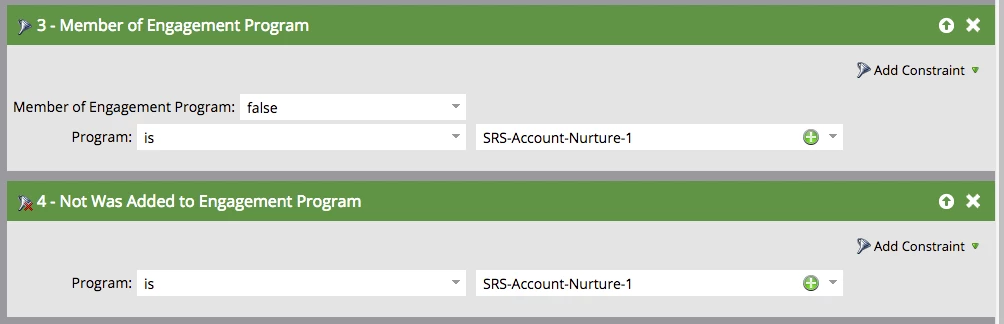
Is there an advantage to using the "Member of Engagement Program" filter or the "Not Was Added to Engagement Program" filter, and are they set up correctly to meet my criteria?

Thank you!
This post is no longer active and is closed to new replies. Need help? Start a new post to ask your question.
Best answer by
Hi Mary,

For your first requirement of "leads who were not delivered a certain email":
Both filters you have shown will behave exactly the same. I personally would use the "Not was delivered email" filter along with "email is" as it is just a more direct statement.

For the second requirement of "are not members of an engagement program":
The filters shown will actually behave differently. The filter of "not was added to an engagement program" looks at a leads entire history. Therefore, if a lead once belonged to a program but is no longer a member, they would be excluded via this filter and the way you have it set. This is because they were in fact once added to the program in the past.

I assume you wish to more specifically target current day non-members of a program. If that's correct, I would use the "member of engagement program" filter exactly the way you have it configured. This only filters based on program membership specifically at the time of cast or trigger event.

Hope this helps!

-Kai H

4 replies

Accepted solution
April 1, 2015
Hi Mary,

For your first requirement of "leads who were not delivered a certain email":
Both filters you have shown will behave exactly the same. I personally would use the "Not was delivered email" filter along with "email is" as it is just a more direct statement.

For the second requirement of "are not members of an engagement program":
The filters shown will actually behave differently. The filter of "not was added to an engagement program" looks at a leads entire history. Therefore, if a lead once belonged to a program but is no longer a member, they would be excluded via this filter and the way you have it set. This is because they were in fact once added to the program in the past.

I assume you wish to more specifically target current day non-members of a program. If that's correct, I would use the "member of engagement program" filter exactly the way you have it configured. This only filters based on program membership specifically at the time of cast or trigger event.

Hope this helps!

-Kai H
April 1, 2015
This was very helpful. Thank you very much!
April 1, 2015
Glad it was helpful. I also should have stated: With just the filters you have pictured above, you will be targeting anyone who has not had the email in question delivered. This includes people who were never sent the email to begin with.

If you want to target only those leads for which the email was actually sent, but not delivered, add a filter for "was sent email".
 
April 1, 2015
Good point -- thank you Kai!