
Updating User expiration dates using API | Community
Skip to main content
anne_sample_f5
Level 3
August 31, 2023
Solved

Updating User expiration dates using API

  • August 31, 2023
  • 2 replies
  • 4397 views

I'm using the "update users API" to change the expiration date for a batch of users.


I am getting a response when I send the post, and it is actually changing the users. But instead of changing to the date I have set in the request, it's changing to "null/never." I've looked at the documentation surrounding the date format (although it's somewhat limited) and I even tried setting one user to the date I wanted, then copying the value from a "get user" response and pasting it into my body, but the same thing keeps happening.


I'm sure I'm missing something obvious, anyone have any ideas?


Here is my post body:

{

"action": "createOrUpdate",

"input": [

{

"expiresAt": "2023-12-31T06:00:00.000t+0000"

}

]

}
This post is no longer active and is closed to new replies. Need help? Start a new post to ask your question.
Best answer by Tes1er_12

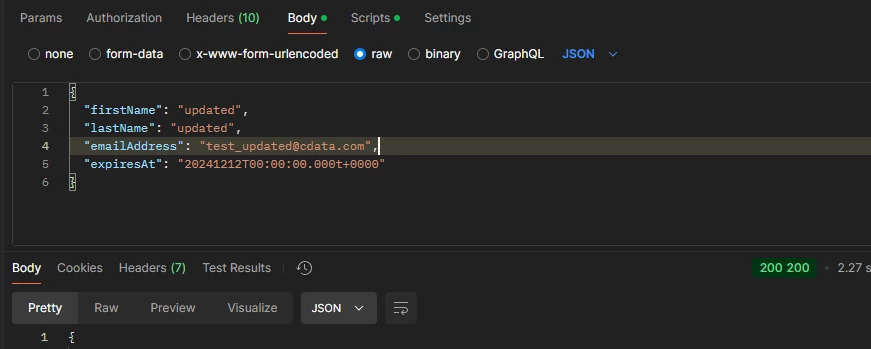
If anyone is trying to update users, not leads the format for /management/v1/users/{userid}/update.json is 

yyyyMMdd'T'HH:mm:ss.SSS't'Z

Example: 20241118T14:29:56.222t+0000
Note that the time-zone does not contain the colon and Z is not accepted (which is really weird). 

2 replies

SanfordWhiteman
Level 10
September 1, 2023

That's not valid ISO 8601. Use ISO UTC

yyyy-MM-ddTHH:mm:ssZ


anne_sample_f5
Level 3
September 1, 2023

Sorry, I don't understand how to resolve that code into an actual date. I spent like two hours trying to figure it out yesterday. 

SanfordWhiteman
Level 10
September 1, 2023
2023-09-01T12:34:56Z

Any datetime library can output this format. It’s the world standard!

Tes1er_12Accepted solution
Level 2
November 18, 2024

If anyone is trying to update users, not leads the format for /management/v1/users/{userid}/update.json is 

yyyyMMdd'T'HH:mm:ss.SSS't'Z

Example: 20241118T14:29:56.222t+0000
Note that the time-zone does not contain the colon and Z is not accepted (which is really weird). 

SanfordWhiteman
Level 10
November 18, 2024

That's really bizarre but you're right, for buggy reasons it doesn't accept the everyday ISO 8601 yyyy-MM-dd'T'HH:mm:ss'Z'. We were too confident that this endpoint works like all the others!