Updating datetime field type with velocity script | Community
Skip to main content
November 16, 2016
Question

Updating datetime field type with velocity script

  • November 16, 2016
  • 1 reply
  • 3195 views

I am looking to pull a datetime field type, {paymentStartDateTime_c}, add one year to the value and display the result.

I also need the value displayed to adjust based on the leads time zone, {timeZone_c}.

Here is the code I am using:
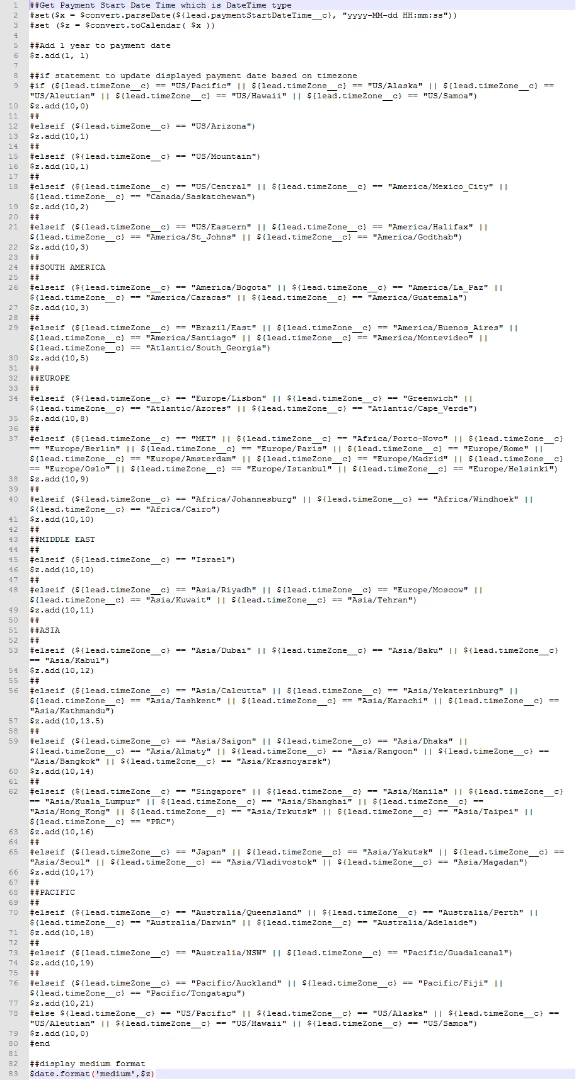
This is the output for a lead located in US/Central time:


     $z.add(1, 1) $z.add(10,2) $date.format('medium',$z)

Suggestions?

Thank you!

This post is no longer active and is closed to new replies. Need help? Start a new post to ask your question.

1 reply

November 17, 2016

@Sanford Whiteman​?

SanfordWhiteman
Level 10
November 18, 2016

That seems... long.

#set( $locale = $date.getLocale() )

#set( $inTimeZone = $date.getTimeZone().getTimeZone($lead.timeZone__c) )

#set( $outTimeZone = $date.getTimeZone().getTimeZone($lead.timeZone__c) )## in and out in same tz

#set( $inCalendar = $convert.toCalendar($convert.parseDate($lead.paymentStartDateTime__c, 'yyyy-MM-dd HH:mm:ss', $locale, $inTimeZone)) )

#set( $tmp = $inCalendar.add( $field.in($inCalendar).YEAR, 1) )

${date.format('medium', $inCalendar, $locale, $outTimeZone)}

March 6, 2017

@Sanford Whiteman​ How easy is it to edit what you've posted to add an hour to a datetime field?

Basically we have a datetime field that when I try to format it for legible use in an email, Marketo chops an hour off of it (because of that weird Velocity timezone thing they've got going on). I just need to add the hour back in within my script token.

I've successfully done this in the past with days, but can't get hours to work. Any help would be appreciated!