
Unsubscribed Leads in Campaigns | Community
Skip to main content
Colby_Dix
Level 4
August 12, 2014
Solved

Unsubscribed Leads in Campaigns

  • August 12, 2014
  • 4 replies
  • 2141 views
So, a co-worker of mine with more experience told me that I need to ALWAYS add a filter to my campaign smart lists that specifies 'Not in' 'Unsubscribed Leads'.

This sounds like something that should be automatic with any campaign no?
This post is no longer active and is closed to new replies. Need help? Start a new post to ask your question.
Best answer by Dory_Viscoglio
Hi Colby, Unsubscribed Leads is a system smart list that is based on the qualification "Unsubscribed" is true. When Unsubscribed is true, Marketo will not email someone.

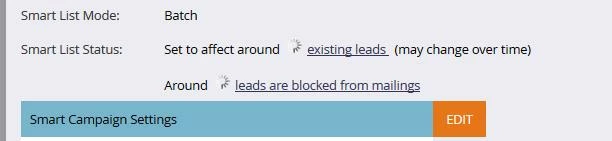
The benefit of adding the filter to the campaign is that they won't go into your calculated number as "blocked from mailing" as shown below. When there is a value other than 0 there, you will want to subtract that number from the "set to affect" number to get an accurate count of how many people this email will be sent to.

4 replies

Dory_Viscoglio
Dory_ViscoglioAccepted solution
Level 10
August 12, 2014
Hi Colby, Unsubscribed Leads is a system smart list that is based on the qualification "Unsubscribed" is true. When Unsubscribed is true, Marketo will not email someone.

The benefit of adding the filter to the campaign is that they won't go into your calculated number as "blocked from mailing" as shown below. When there is a value other than 0 there, you will want to subtract that number from the "set to affect" number to get an accurate count of how many people this email will be sent to.

Level 9
August 12, 2014
MKTO knows not to send to unsubscribed leads. But that being said, I have a smart list (that includes unsubscribes, invalids, suspended, competitors, etc) and alway include that suppression list in email sends just to be on the super safe side!
Michelle_Tizian
Level 10
August 12, 2014
If you don't add the filter in your smart list for "Not in" Unsubscribed leads, the email will still not send to those unsubscribed leads. When you schedule your campaign it will show you the # of people who are blocked from receiving the email campaign if they are marked unsubscribed, marketing suspend and if email invalid is true.  
August 12, 2014
It depends on the purpose of the campaign smart list. From a list cleanliness/reproting perspective, you probably should. From a functionality perspective, it doesn't need to be (ex. will unsubscribes be messaged? no).

When you create a campaign smart list leads that are excluded from the recieving a mailing will be noted on the schedule tab. You will see language to the effect of "Around XX leads are blocked from mailings" right below the Smart List Status that indicates who will be affected. The unsubscribed folks (or marketing suspended, blacklisted, etc) will never be mailed.

You are both right depending on the purpose of the campaign and your internal process. Rest assured that unsolicited mail will not be sent though. They are automatically excluded whether you include the filter or not.